
PBXware's Call Center Statistics module offers a comprehensive suite of tools to monitor and analyze agent performance, call handling, and overall call center efficiency.
Agent statistics provide a comprehensive and detailed view of agent performance and activities. Key functionalities include selecting specific periods, agents, and report templates to generate tailored insights.
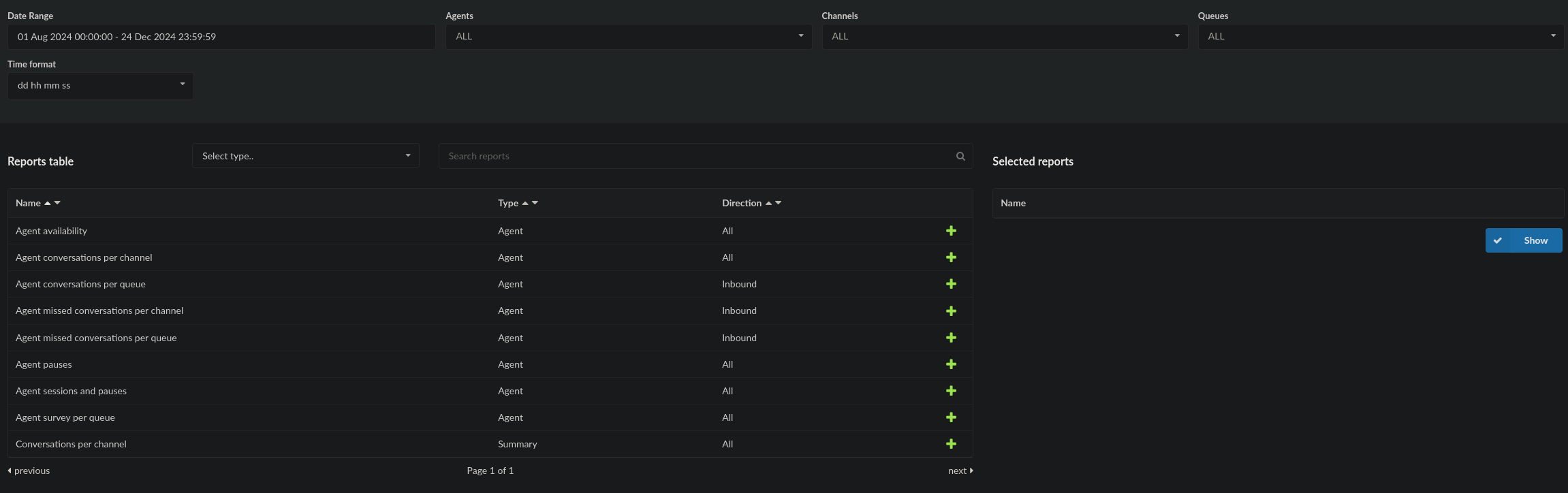
Features
Date Range: Define the period for which statistics are displayed (e.g., start and end dates). Select this option to specify the desired time frame.
Agents: Choose either a specific agent or all agents for the statistics. Use the provided dropdown menu to make your selection and click the 'Show' button to generate the report.
Reports Table: Access a list of all available report templates and select the preferred one for detailed insights.
Search: Quickly locate reports by typing specific titles or keywords into the search bar.
Selected Reports: View all the selected reports in a table format. Click the 'Show' button to generate statistics for these reports.
Note: Clicking the 'Show' button redirects you to the Reports page, where additional details about the chosen report are displayed. Hovering over the Start date and End date rows reveals the last generated time, based on the system clock.
Available Agent Reports
Agent Availability: Provides detailed information about agent activities, including calls, sessions, pauses, and idle times. Offers a quick overview of agent availability.
Agent Conversations per Channel: Displays the number of conversations handled by agents, grouped by communication channel.
Agent Conversations per Queue: Highlights agent conversations grouped by specific queues for inbound interactions.
Agent Missed Conversations per Channel: Reports on missed conversations by agents, categorized by communication channel for inbound interactions.
Agent Missed Conversations per Queue: Provides insights into missed conversations by agents, grouped by specific queues for inbound interactions.
Agent Pauses: Reports on pauses taken by agents, including those with or without reasons, as well as billable and payable pauses.
Agent Sessions and Pauses: Provides information on agent sessions and associated pauses, focusing on the number of pauses per session.
Agent Survey per Queue: Displays survey results for specific queues, grouped by agent.
Conversations per Channel: Summarizes the total number of conversations across all communication channels.
By utilizing these detailed reports, supervisors can monitor performance, identify trends, and optimize call center operations effectively.
Meaning of Fields
Below is a comprehensive list of fields commonly used in report tables. Certain specialized fields unique to specific reports are explained within their respective descriptions. Other fields are self-explanatory.
Fields
Agent: Displays the agent number and name in the format:
Agent number (Name Last name)Queue: Name of the queue.
Calls: Includes inbound, outbound, or both types.
Number: Total number of calls.
Per Hour: Average number of calls per hour.
Calculated as: Per hour = Number of calls / Session time / 3600.
Note: Does not include time when the agent is on pause.
Perc: Percentage of calls by all agents, relative to current agent calls.
Calculated as: Calls / Total calls of all agents.
Answered: Total answered calls by the agent.
Unanswered: Total unanswered calls by the agent.
Talk Time:
Total: Total talk time of the agent.
Mean: Average talk time.
Min: Shortest talk time.
Max: Longest talk time.
Hold Time:
Total: Total hold time.
Mean: Average hold time.
Min: Shortest hold time.
Max: Longest hold time.
Idle Time:
Total: Total idle time.
Calculated as: Idle time = Session time - Pause time - Talk time.
Note: In older statistics, idle time was calculated as the difference between session and talk time only.
Pause: Represents agent pauses, with or without reason codes. Includes:
Total (Pause Duration): Total duration of all pauses.
Count: Number of pauses taken by the agent.
Pause with Reason:
Total: Total duration of pauses with reason codes.
Count: Number of pauses with reasons.
Not Ready: Calculates pauses without reason codes.
Total: Duration of pauses without reasons.
Count: Number of pauses without reasons.
Billable: Represents billable pauses using reason codes.
Duration: Duration of billable pauses.
Count: Number of billable pauses.
Percent: Percentage of billable pause duration.
Calculated as: Billable duration / Pause duration * 100.
Note: Excludes "Not Ready" duration.
Payable: Represents payable pauses using reason codes.
Duration: Duration of payable pauses.
Count: Number of payable pauses.
Percent: Percentage of payable pause duration.
Calculated as: Payable duration / Pause duration * 100.
Note: Excludes "Not Ready" duration.
Session:
Total (Session Duration): Total time the agent was logged in.
Mean: Average session duration.
Calculated as: Mean time = Session time / Number of sessions.
Count: Number of sessions (logins).
Occupancy: Percentage of time the agent was occupied.
Calculated as: Occupancy = Talk time / (Session time - Pause time) * 100.
Hng (Ag/Cal [Tr]) (Hang-ups):
Number: Total hang-ups by Agent/Caller [Transfer].
Percent: Percentage of hang-ups by Agent/Caller [Transfer].
Agent Hang-ups [%]: Percentage of calls ended by agents.
Caller Hang-ups [%]: Percentage of calls ended by callers.
Transfers [%]: Percentage of calls transferred.
Abandoned [%]: Percentage of calls abandoned.
Timed Out [%]: Percentage of calls that ended due to timeout.
Dumps [%]: Percentage of calls dumped by agent or caller.
Busy [%]: Percentage of outbound calls marked as busy.
No Answer [%]: Percentage of outbound calls not answered.
Cancel [%]: Percentage of outbound calls canceled.
Unqualified [%]: Percentage of calls finished in other manners.
Meaning of Breakdown Fields
Fields are formatted as:
Field Name (Synonym Name) - Description
Call ID: Unique ID of the event.
Date: Date the event occurred.
Caller ID: Extension of the caller.
Queue: Queue name where the event occurred (empty for outbound events).
Agent: Agent number ("NONE" if the call did not connect with an agent).
Wait Time: Waiting time in seconds.
Talk Time: Talking time in seconds.
Entry: Caller position in the queue at the point of entry.
Exit: Caller position in the queue at the point of exit.
Transferred: Extension where the call was transferred.
Dumped: Indicates if the caller was dumped.
Ended (Event Type): Name of the event.
Start: Start date and time of the event.
Duration: Duration of the event.
Extension: Extension where the event occurred.
Reason Code: Used with agent pauses, displaying the reason name if applicable.
Notes:
"Entry Calls Not Connected" shows queue unanswered calls or calls that did not connect with agents.
Mean Hold Time is calculated as:
Mean = Hold time / Calls.
Mean Talk Time is calculated as:
Mean = Talk time / Calls.
Agent availability
This report includes all calls that agents had (inbound and outbound) and it has the most
information. Along with this report you have additional possbility to download CSV for Agents
performance and assesment. This two CSV files are special and they will show more
information about agents and their calls per day.
Here we can see the overview of the agent availability for every agent.
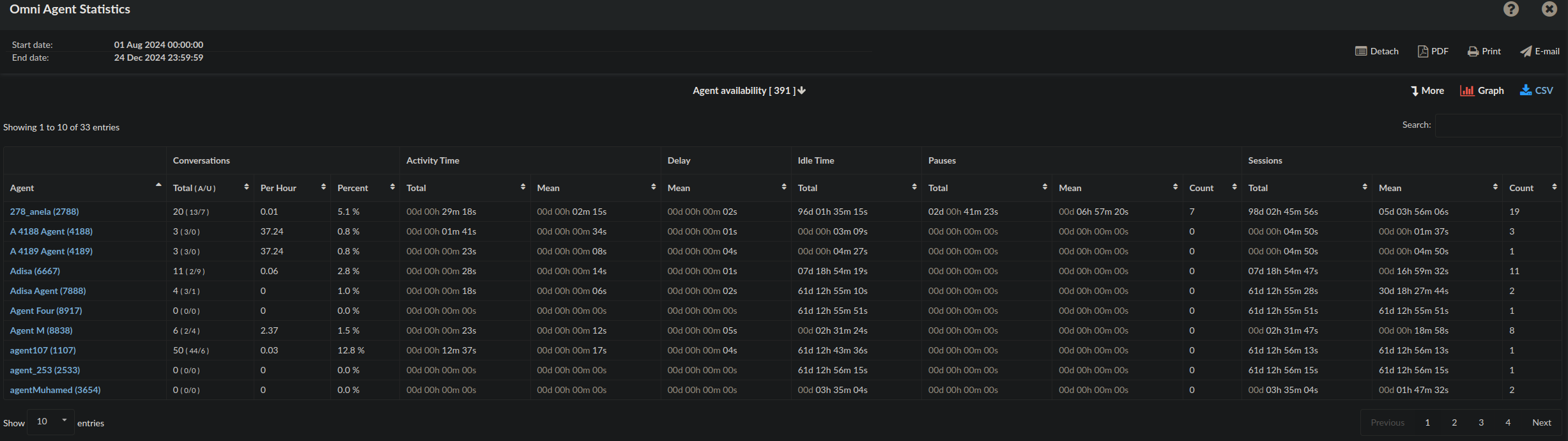
In the agent availability overview, you can select a specific agent to access detailed individual statistics. Upon selecting an agent, a breakdown of their availability is displayed, as illustrated below.
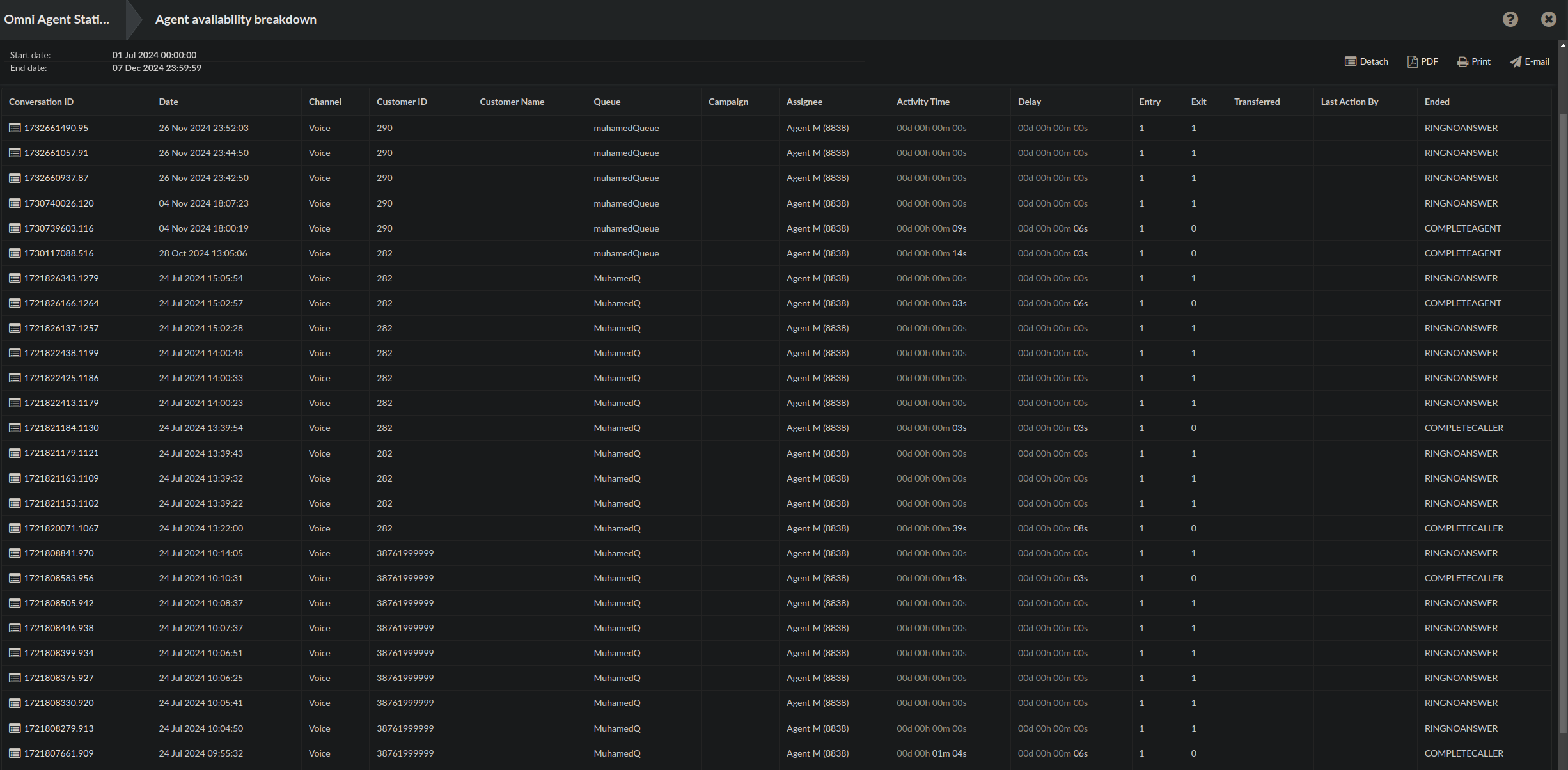
The agent availability breakdown provides comprehensive information about a specific agent, including details such as the conversation ID and the date and time of the call. It also displays the channel type used for the call, the Customer ID (indicating the number or extension), and the customer's name, if available. Additionally, it identifies the queue the agent belongs to and whether the agent is part of a campaign. The breakdown includes the activity time, which indicates the call duration, and notes if the call was transferred, who performed the last action, and how the call concluded.
Agent conversations per channels
With the integration of Omnichannel into PBXware, it is now possible to filter agent conversations by channel. The available channels include voice calls, SMS, live chat, and social media platforms such as WhatsApp and Facebook, providing a streamlined way to manage and analyze interactions across multiple communication mediums.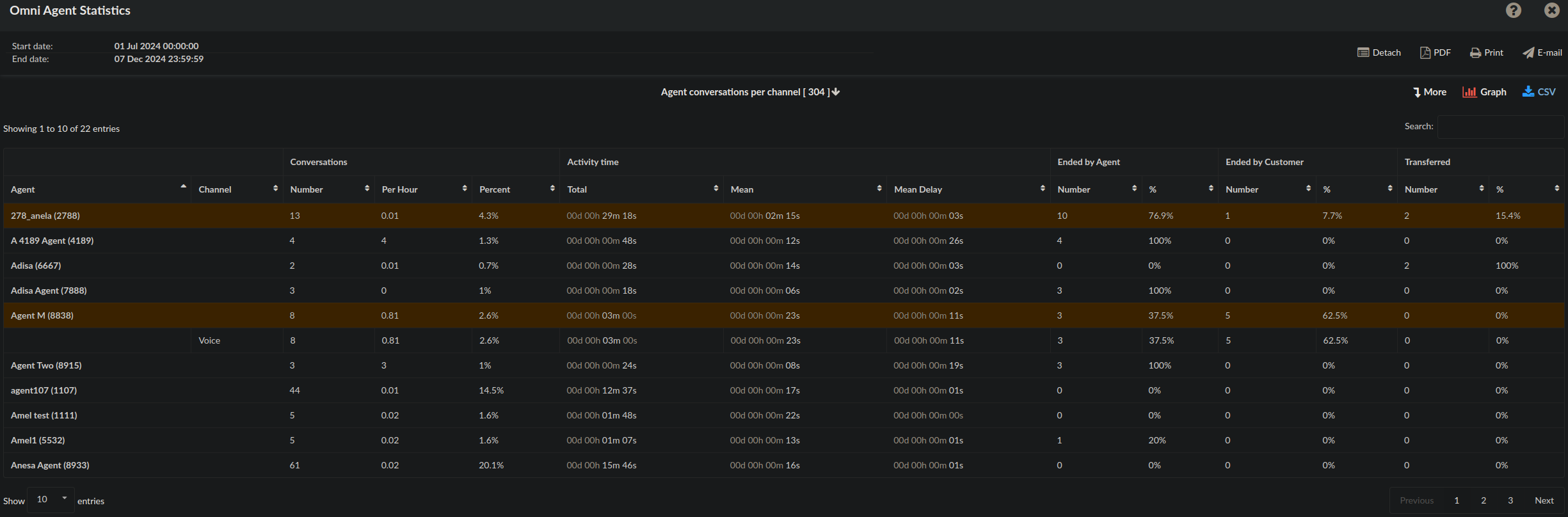
In addition to the standard statistics, such as the number of conversations and activity times, a new field labeled 'Channel' has been added. To view the specific channels used by an agent, simply click on the 'Channel' field, which will display the channels utilized by that agent.
In the breakdown field for Agent conversations per channel we can see that the addition of the Channel field as well, which would indicate the usage of the channels per agent.

Agent conversations per queue (INBOUND)
This section of the report displays all inbound agent conversations and differentiates the calls by queue. As shown in the image, after clicking on the 'Queue' field for a specific client, the number of conversations will be displayed separately for each queue, especially if the agent is assigned to multiple queues.
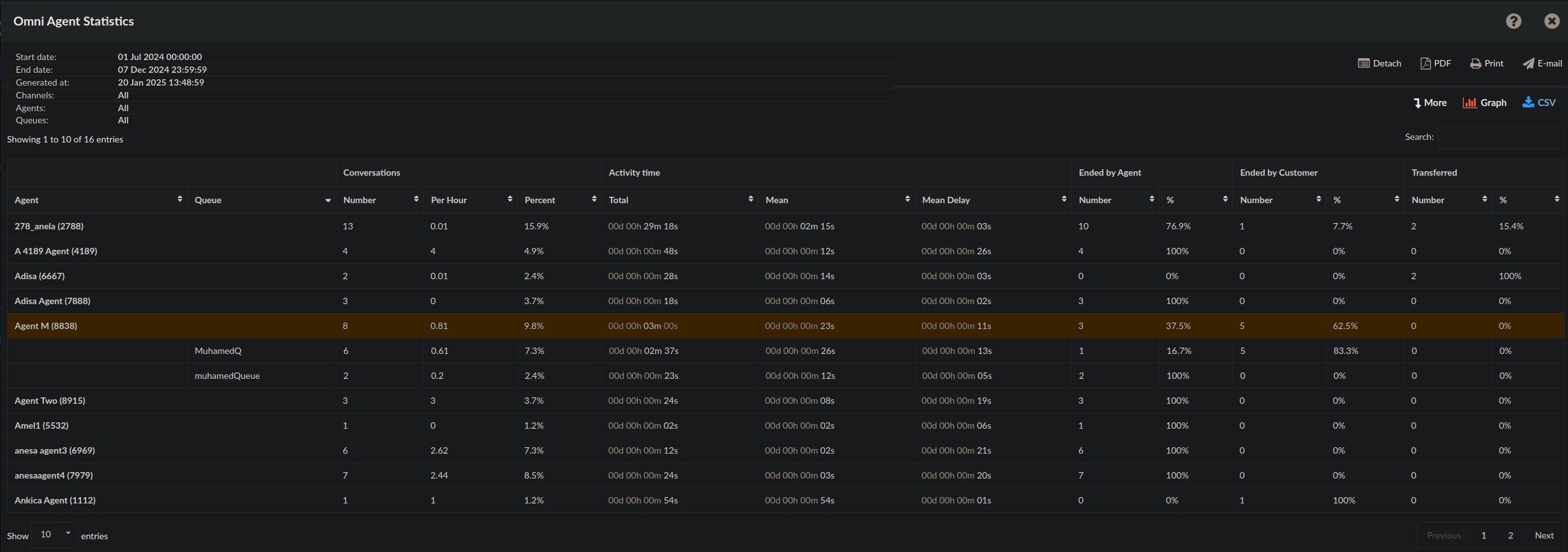
The 'Per Hour' metric is summarized for each agent across all queues, as session time cannot be tracked separately for each queue. Therefore, the per-hour value for a specific queue may not be entirely accurate, as it includes session time for every queue the agent is logged into. However, the summarized value for each agent remains accurate.
Agent conversations per queue breakdown with additional information.

Agent missed conversation per channel (INBOUND)
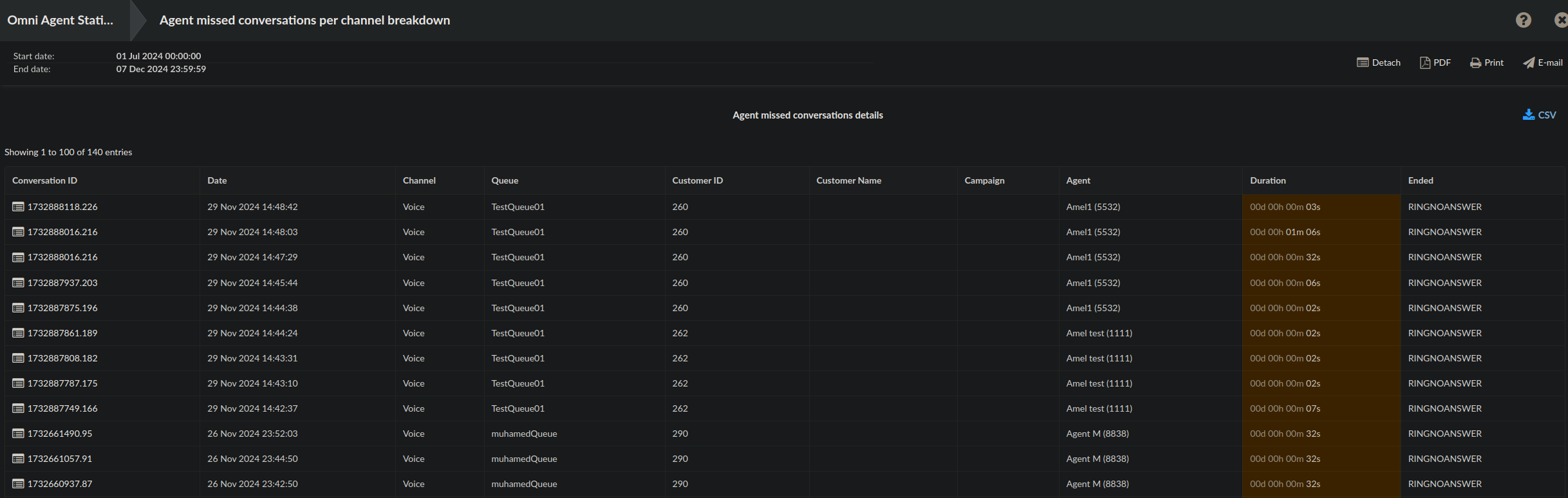
The 'Agent Missed Conversations per Channel' report displays the total number of missed inbound calls for each channel. While it shows the overall number of missed calls, if the agent is part of multiple channels, the missed calls can be filtered by channel. For example, if there are 20 missed calls in total, and 10 of those are from the Voice channel, selecting the 'Channel' field will reveal the breakdown, showing the specific number of missed calls per channel.

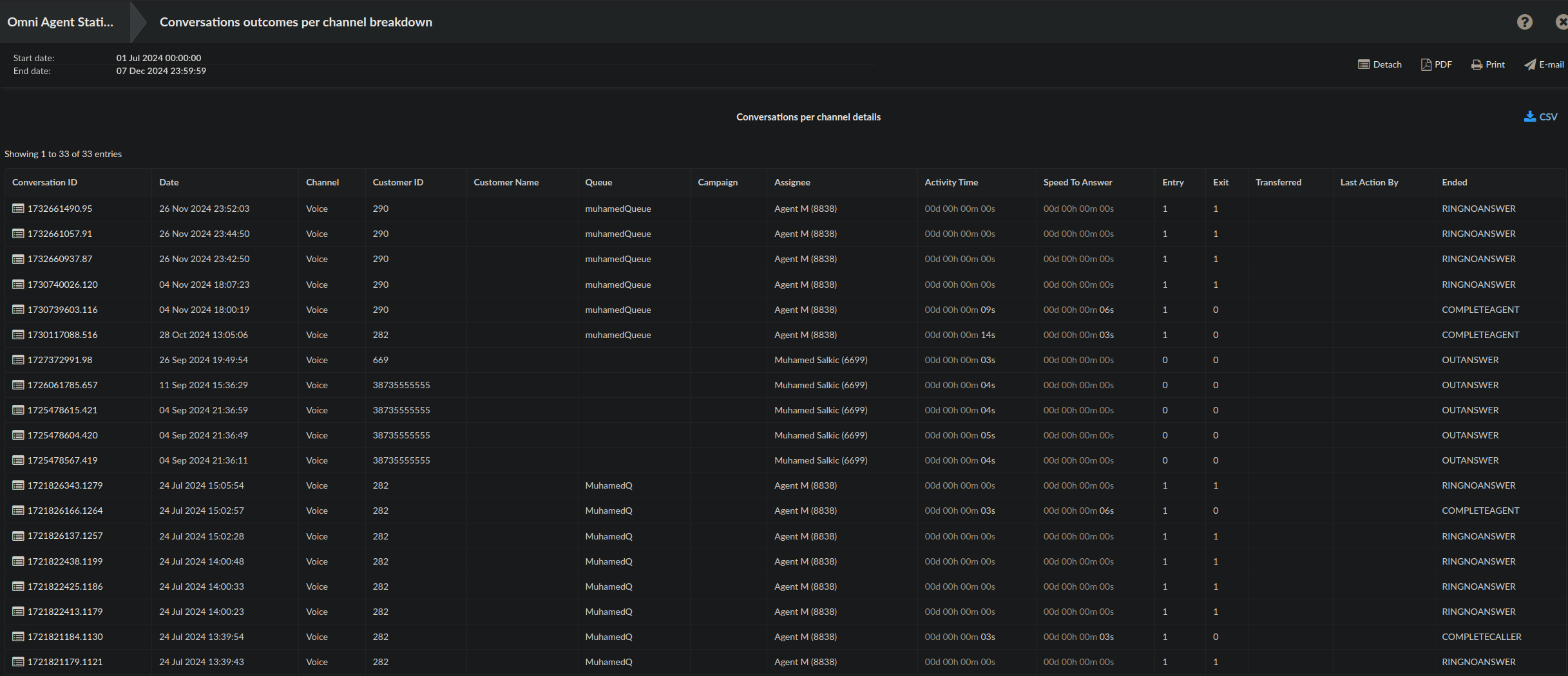
After selecting the Agent missed conversations per channel breakdown we could see additional information for each missed calls, which would usually show RINGNOANSWER on the Ended field.
Agent missed conversations per queue (INBOUND)
This report section provides detailed information about missed inbound calls per queue for each agent. The data is organized by queue, allowing users to view how missed calls are distributed across agents and queues. As shown in the image, if an agent is part of multiple queues, the report will display the number of missed calls for each individual queue.
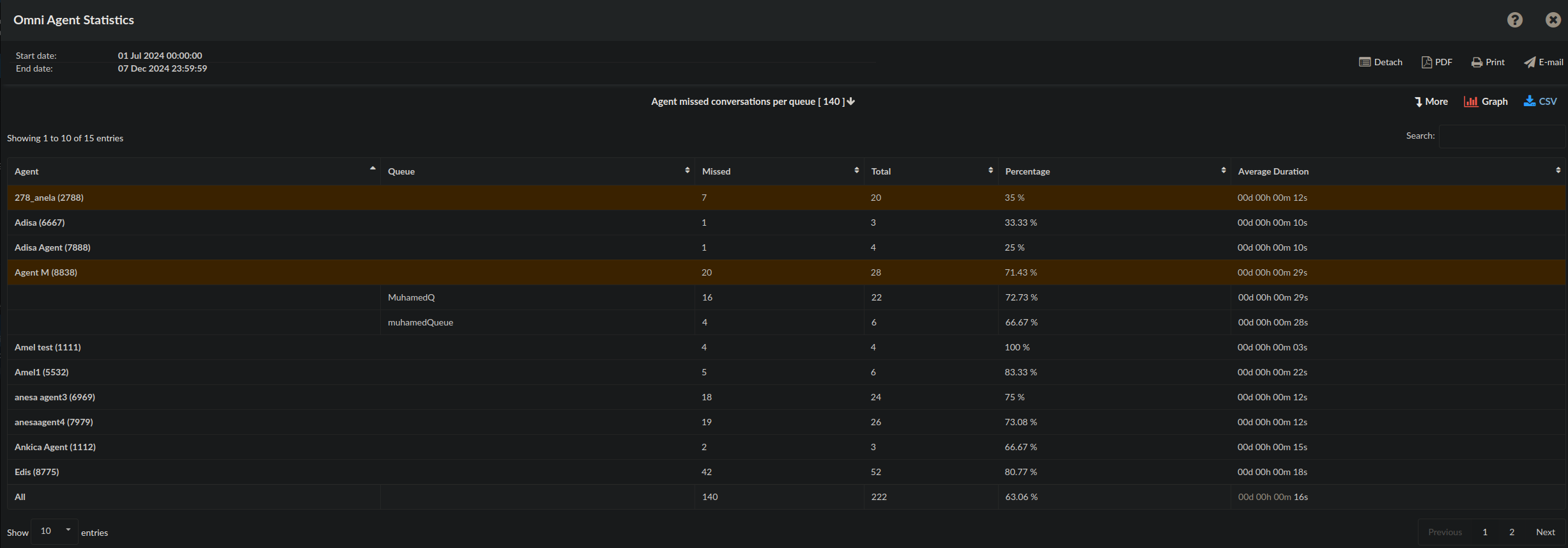
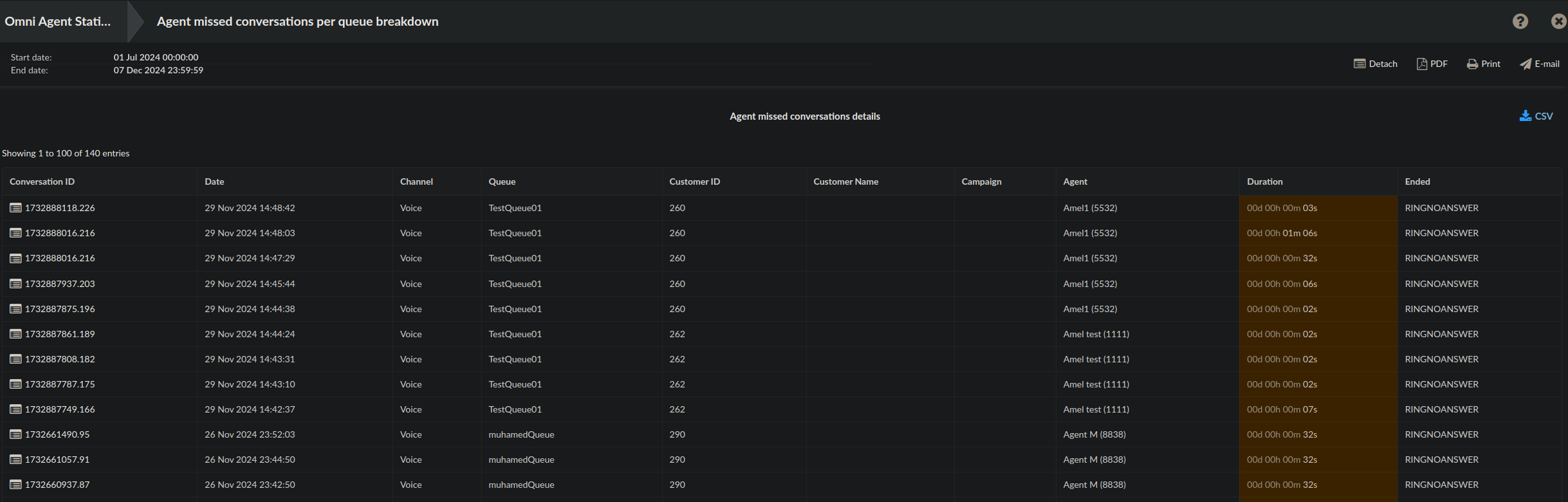
As demonstrated once again, the 'Agent Missed Conversations per Queue' breakdown provides a list of 'RINGNOANSWER' calls, showing the missed calls for each agent per queue.
Agent pauses
This section provides details about agent pauses. To ensure accurate tracking, 'Agent Reason Codes' should be utilized. Each pause (reason code) can be categorized as billable or payable, depending on the configuration of the reason codes. Agents can enter a 'Pause' state or a 'Not Ready' state. While the 'Not Ready' state cannot be classified as billable or payable, it is included for comparison purposes.
Pause reasons
When an Agent needs to temporarily stop receiving calls without logging off, they have the option to pause. By pausing, the Agent will be temporarily unavailable to receive calls until they decide to unpause.
Pausing allows Agents to take short breaks, attend to other tasks, or temporarily step away from their workstations while remaining logged into the system. During the pause, calls will be routed to other available Agents or handled according to the configured call handling rules.
he Agent Pause report section displays pauses along with their corresponding reason codes, including regular pauses. Additionally, it provides information on billable and payable pauses, including the duration and count of each pause type.
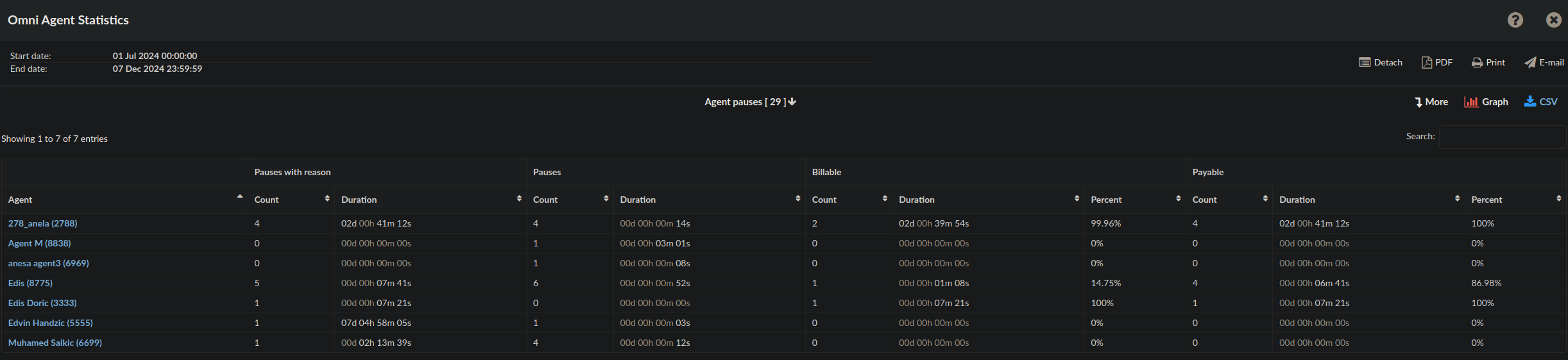
Individual agents can be selected if they have recorded pauses in their work. Upon selecting a specific agent, a list of all their pauses is displayed. Additionally, more detailed information about each pause is available, including the start and end date, duration, whether the pause was billable or payable, the associated reason codes, and the name of the pause.

Agent sessions and pauses
Agent sessions and pauses report section shows details about agent pauses and session. With this report you can compare agent pauses against agent logins.
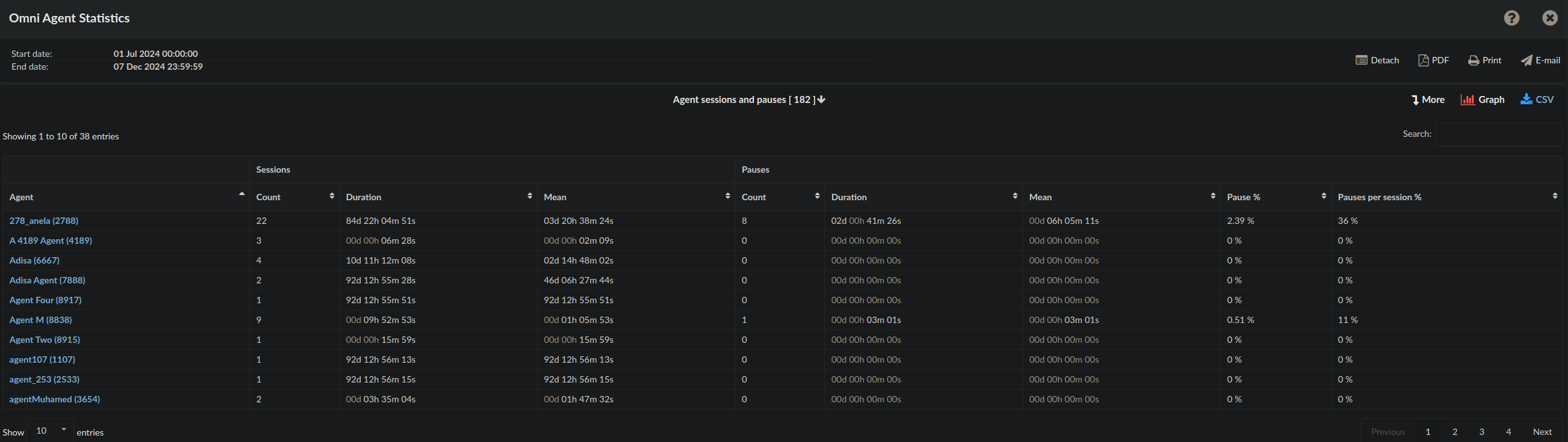
The pause calculation includes both pauses with a reason and 'Not Ready' states.
Pause %: This represents the percentage of session duration attributed to pause time (both with and without a reason).
Pauses per Session: This indicates the total number of pauses (both with and without a reason) per session.
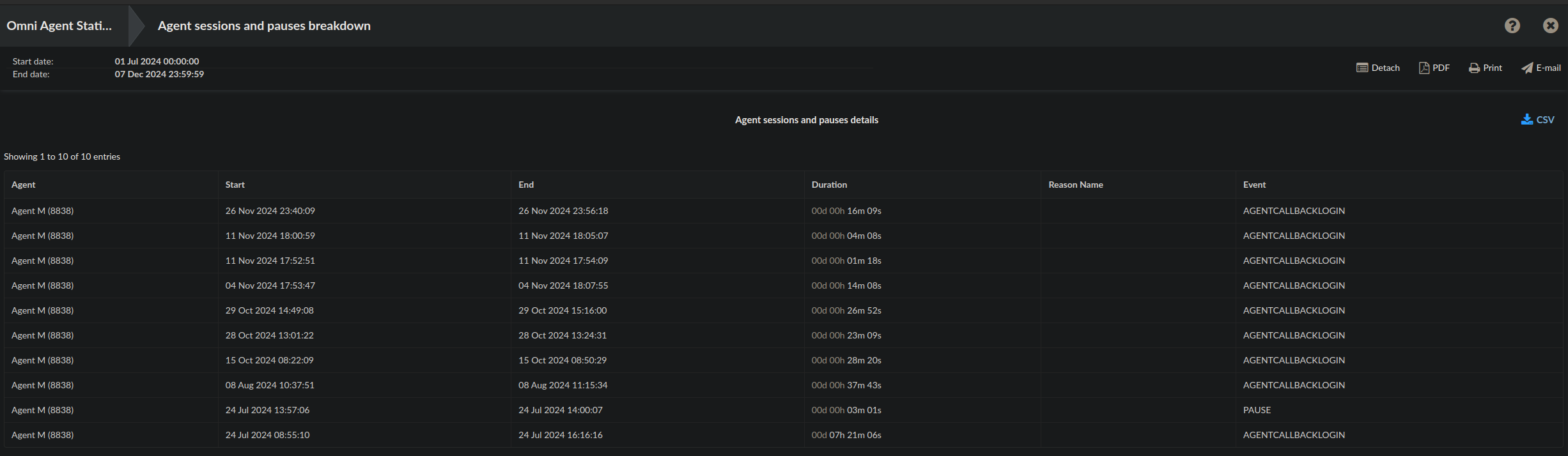
The Agent Sessions and Pauses breakdown provides detailed information for each specific agent. It includes the start and end date, session duration, and a record of all events that occurred during the session.
Conversations per channel (SUMMARY)
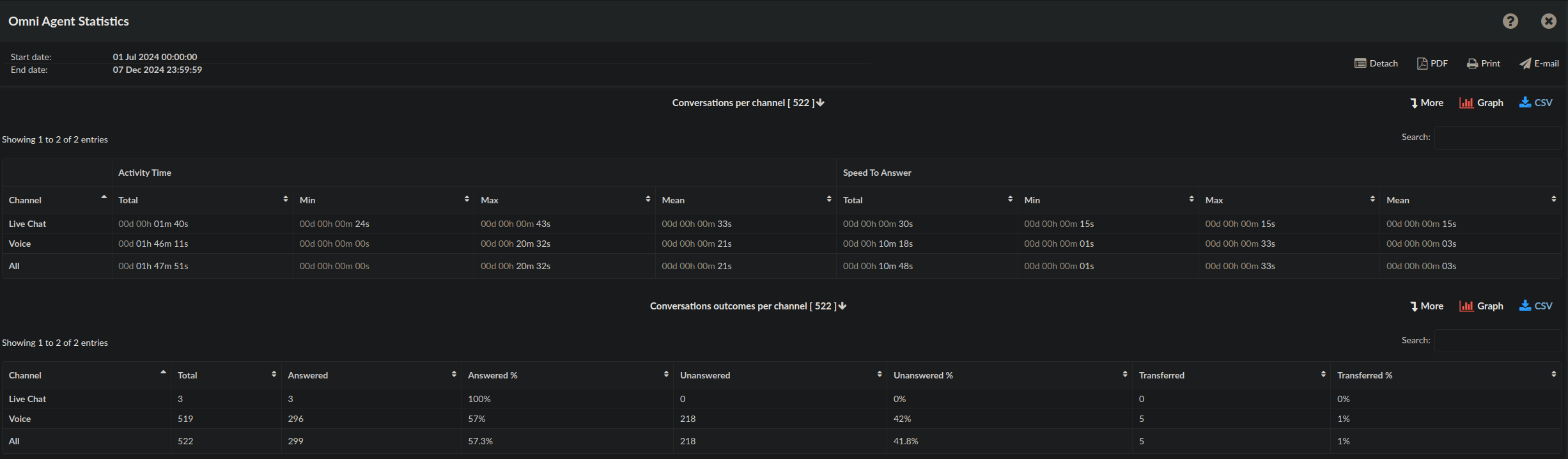
This report section summarizes the total number of conversations across all communication channels.
The statistics provided give insight into agent activity across different channels, specifically Live Chat and Voice, and show detailed metrics on both activity time and response speed.
Conversation Outcomes per Channel
This section summarizes the outcome of conversations across channels, including the number of answered, unanswered, and transferred conversations.
Once again, the breakdown of the statistics provides detailed information about all conversations per channel, offering insights into key metrics such as activity time, speed to answer, and conversation outcomes. This allows for a comprehensive understanding of agent performance and response efficiency across different communication channels.
Meaning of Ended events
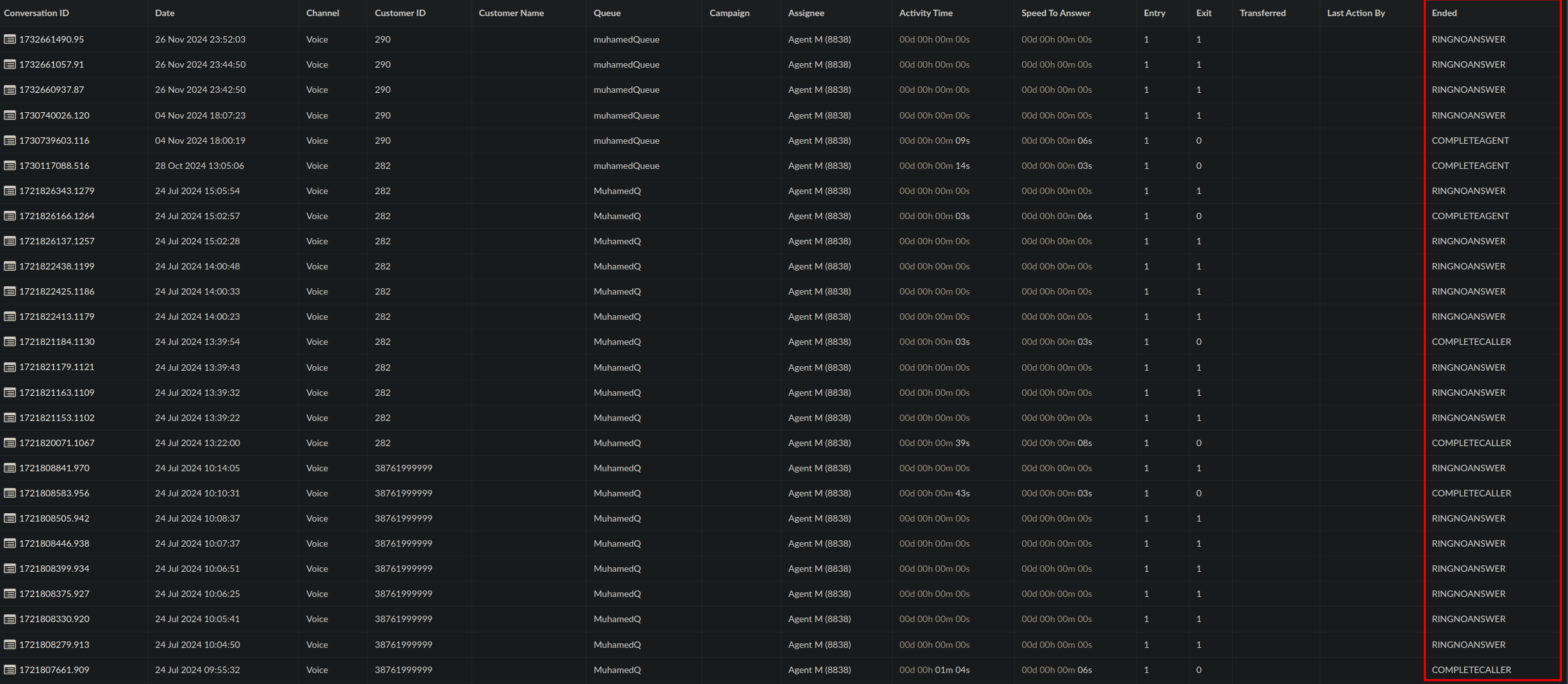
In PBXware, ended event types refer to specific reasons or conditions under which a call is terminated. Understanding these event types is key to interpreting call statistics and agent performance.
1. CONVERSATION_AGENT_END
The call ended because the agent actively disconnected the call after a conversation with the customer.
2. COMPLETEAGENT
The call ended when the agent disconnected, but the emphasis is on the fact that the agent completed the interaction successfully.
3. COMPLETECALLER
The call ended because the caller disconnected the call.
4. CONVERSATION_TRANSFER
The call ended because it was transferred to another agent, queue, or department during an active conversation.
5. CONVERSATION_CUSTOMER_END
The call ended because the customer hung up during an active conversation.
6. RINGNOANSWER
The call ended because the agent did not answer while the call was ringing.
7. OUTANSWER
The call was answered by the recipient of an outbound call made by the agent.
8. BLINDTRANSFER
The call was transferred to another destination by utilizing the Blind transfer option.
Breakdowns
The breakdown format is consistent across most reports, providing a clear and organized view of the data. In most cases, you can filter the breakdown by selecting an Agent, Queue, or Caller to narrow down the displayed results.
Exporting Data:
PDF Download: The PDF export follows a WYSIWYG (What You See Is What You Get) format, meaning it will download per page as it appears on screen.
CSV Download: A CSV export will download all records in the breakdown. If you require all data, the CSV is the appropriate format.
Agent Session and Pauses Breakdown:
This section provides detailed information about agent sessions and pauses, including the following:
Login and Pause Start Times: The exact time when an agent logged in or when a pause started.
Duration: The length of time the session or pause lasted.
Reason Codes: For pauses, the Reason Name column displays the set reason for the pause event.
Agent Pause Breakdown:
The breakdown includes additional fields:
Billable and Payable: These fields are associated with agent pause reason codes. If the reason codes are configured under the agent pause section, these fields will indicate whether the pause is billable or payable.
Reason Code and Name: For each pause event, the corresponding reason code and its name are displayed.
Important Note: If a reason code is edited or deleted, the reason name may no longer display as expected. If edited, the new name for the reason code will replace the previous one in the breakdown.
Meaning of all the fields can be found at Meaning of fields at the beginning of the document.