
1. Introduction to MOS
MOS (Mean Opinion Score) is a subjective measure of communication system quality.
Originally developed for traditional telephony, it has been adapted for VoIP systems to provide a standardized metric for call quality assessment.
1.1 How MOS is Calculated
MOS is calculated based on several key parameters:
• Bandwidth
• Jitter
• Latency
• Packet loss
• Codec version
The score is presented on a scale from 1 to 5, where 5 represents excellent quality and 1 represents
poor quality.
2. MOS Implementation in PBXware
2.1 Asterisk Integration
Asterisk automatically calculates MOS scores for us. The system generates a new AMI (Asterisk Manager Interface) event that contains the following information:
• Channel name
• RTPAUDIOQOSMES channel variable
• Linked ID
• Unique ID of the channel
This AMI event is generated every time a channel hangs up.
2.2 Database Storage
In MySQL, there is a table called mes in the PBXware database. This table stores data from AMI events along with:
• An ID field (primary key)
• eventdate column - the timestamp when data was written to the table
The pwproxy component is responsible for listening to AMI events and writing data from
these events into the mes table.
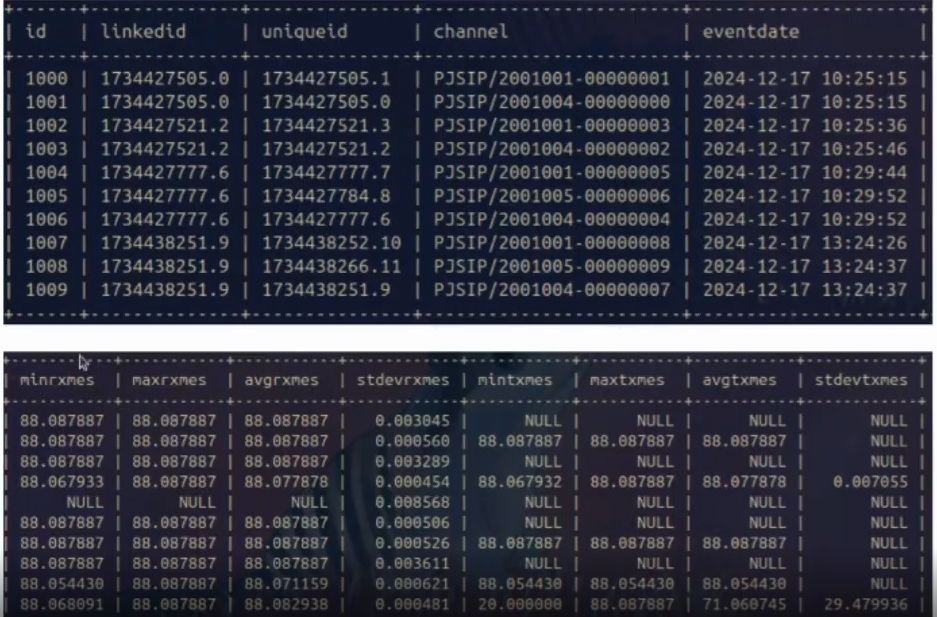 Figure 1: MES Table Structure and Sample Data
2.3 Score Conversion
The results obtained from Asterisk are on a scale of 1-100. To display them in the GUI on a scale of 1-5, we divide by 20.
Asterisk provides two scores for each channel:
• Local MES
• Remote MES
Important Note: The maximum value that can be achieved using Asterisk’s calculation method is 4.5.
2.4 NULL Values
If a NULL value appears in the table, the call was likely very short and Asterisk did not
have time to calculate the value.
3. MOS in CDR Reports
3.1 Calculation Method
The scores in CDR (Call Detail Records) represent the quality for the entire call. All rows with the same Linked ID will show the same MOS score, representing the average for all channels that were part of that call.
The calculation formula is:

Where avgrxmes and avgtxmes are values stored in the mes table in the database. The factor 2 is used solely because a call consists of two channels.
3.2 MOS Grading Scale
MOS values in the PBXware GUI follow this grading system:
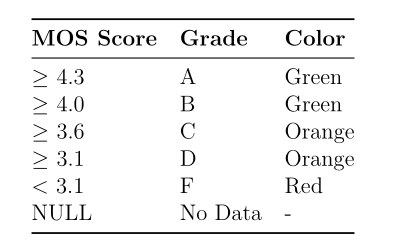
3.3 MOS Column in CDR Reports
This column displays information about the call quality (MOS) for a specific CDR report.
The value in this column represents the average score for all the channels included in the call,
denoted by a number and its corresponding grade.
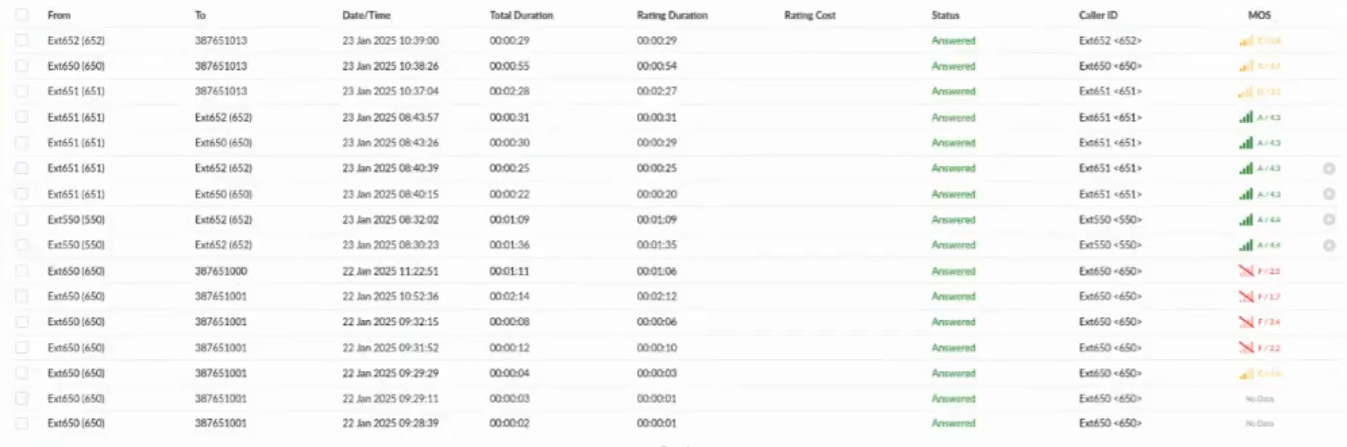
Figure 2: MOS Display in CDR Reports
By clicking on the MOS score, a pop-up window will appear, providing further details, including the Average MOS, Minimum MOS, and Maximum MOS for each channel sharing the same Linked ID.

Figure 3: MOS Details Pop-up Window
3.4 Pop-up Restrictions
Note: If a site user has limited access to CDR reports, the MOS pop-up will be disabled for them. The pop-up is also disabled in OSC (Operator Soft Client) to prevent displaying values from other extensions.
4. Configuration Options
4.1 Hiding Metrics
The display of MOS data in the GUI can be hidden at both the master and tenant levels through:
Call Quality → Hide Metrics:
• If the setting is ”Not Set” on the tenant level, the master tenant setting will be
used
• Data continues to be written to the database even when hidden in the GUI
• Regardless of GUI settings, data can be retrieved through the API

Figure 5: MOS Logging Disabled Notification
4.2 Disabled MOS Logging
If MOS score logging is disabled and metrics are not hidden, the MOS score number will not show up in this column. Instead, a grayed-out signal icon will appear in its place.
Hovering over this icon will trigger a popup to appear, informing the user that MOS
logging is disabled.

Figure 6: MOS Logging Disabled Notification
5. API Access
MOS data can be retrieved through the PBXware API using two different methods:
5.1 CDR Download API
This method returns MOS values as they appear in the GUI:
http://{IP}index.php?apikey={API_Key}
&action=pbxware.cdr.download
&server=2
&start=Apr-01-2025
&end=Apr-01-2025
&starttime=00:00:00
&endtime=08:59:59
&limit=1
5.2 CDR MOS API
This method returns detailed MOS values as they appear in the pop-up:
http://{IP}index.php?apikey={API_Key}
&action=pbxware.cdr.mos
&uniqueid=1743576829.49
6. Summary
MOS scoring in PBXware provides a comprehensive and objective measure of call quality.
The system automatically captures, calculates, and stores quality metrics for every call, making it easy to monitor and troubleshoot voice quality issues. With flexible display options and API access, administrators can customize how MOS data is presented while maintaining complete records in the database for analysis and reporting purposes.