
If there is a high disk usage on PBXware (>90%), you will need to verify what is taking the storage and release if possible. Usually, what could take the most of storage is:
- MySQL CDR table
/opt/pbxware/pw/var/lib/mysql/pbxware
- Call recordings
/opt/pbxware/pw/var/spool/asterisk/monitor
- Logs
/opt/pbxware/pw/var/log
- Core-dump
/opt/pbxware/pw/tmp
To check what is using the most of storage, you may use the following command:
du -a --max-depth=1 /opt/pbxware/pw | sort -n -r | head -n 10 | awk '{size=$1/1024; printf "%.2fMB %s\n", size, $2}'Output example:
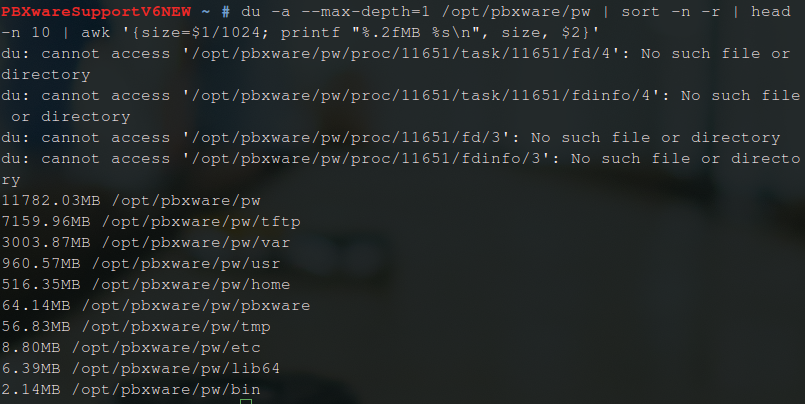
This command will inspect /opt/pbxware/pw folder and sort by size 10 largest files. The output will be displayed in MB on the screen. You may change the path to something else, but the/opt/pbxware/pw path usually contains everything that might take storage.
If the usage is 99 or 100%, you will not be able to run this command as there is almost no additional space left. In this case, you may either check the folders shown above and remove unnecessary files (e.g. old logs, core dumps, and similar) just to free enough storage to check what is actually taking the storage or instruct the customer to expand the PBXware storage. If it is VPS on our hosted platform, or VPS on customer's SW, you can easily expand the storage. However, if it is a VM of some type, the customer would need to expand the disk size.
What is important to check if you can not determine what is taking the most of space:
- Check if the general log is enabled for MySQL and disable if it is.
- Check if the Asterisk full log is enabled and disable if it is.
- Check if there are multiple chat_server instances running causing the pwproxy log to fill up quickly. If that is the case, kill the chat_server, start it again, and empty the pwproxy.log
To empty log files, you may use:
cat /dev/null > /opt/pbxware/pw/var/log/logfilefilder/logfilename
If the CDR table is taking the majority of space (for example, the customer has VPS of 10GB and CDR is taking 9GB), they would need to expand their disk size because that is kind of expected storage usage. Even if they want to archive CDRs, they would still need to expand the disk size as for the CDR archiving process you need x2 space.
If recordings are using the majority of space, the customer has an option of setting up Archiving Storage on PBXware and offloading recordings to free up space. The important part is to select 'Remove files' on the Archiving section to make sure that recordings are removed from PBXware once offloaded.