
The purpose of this document is to explain and outline the steps for safely shutting down the servers in case there is a need to move them to a different location.
This procedure is to be used to ensure that no major disruptions of services occur due to improper shutdown of the servers.
The recommended procedure for shutting down the servers for maintenance consists of:
- stopping the VPSes
- enabling the maintenance mode
- graceful shutdown of the servers
If you are physically moving the servers to another location, we recommend taking a photo of the cabling, to ensure the servers are cabled exactly the same as before the move.
Firstly, the instructions will be provided for the Mirror edition of SERVERware and the procedure for the Cluster edition will be provided afterwards. If you are the administrator of a SERVERware 4/5 Cluster, we recommend going through the Mirror edition instructions as they are also required for the cluster.
1.1 Safely shutting down the servers - SERVERware Mirror Edition
The first step is to log in to the GUI of the SERVERware by entering the Controller IP address in the preferred browser.
If there are VPS instances running on the Mirror, it is recommended that all VPSes be stopped first through the VPSs section by selecting each VPS and clicking the 'Stop' button.
Next, in the Hosts section in the SERVERware GUI, a user needs to select the Mirror and set the Mirror in to the Maintenance mode.
Maintenance mode option is located in the upper right corner of the Hosts panel. If a backup server is available and needs to be shutdown as well, you also need to put it into maintenance mode.
Firstly, the server in 'secondary' state needs to be shutdown first. The check which server is in secondary state you can easily navigate to the Hosts section in your Controller GUI

In the above example, the server with IP address 185.59.92.28 is currently in secondary state, and server with 185.59.92.29 is in primary state. So in this example we would SSH into 185.59.92.28 and start the shutdown procedure.
If your GUI does not have the information about the primary and secondary servers, you can check the state of the server via CLI using the following procedure:
For SSH, open the Terminal ( if Linux or Mac is used), and execute:
ssh swadmin@HOST_IP -p2222
Then, a user will be prompted to enter the root password.
Once logged in, a user needs to log in as root by executing the following command:
sudo -s
and enter the root password again.
For Windows users, any preferred SSH client can be used, in this example PuTTY is used. Open PuTTY and enter the IP address of the Server and SERVERware SSH port2222 as in the example below:
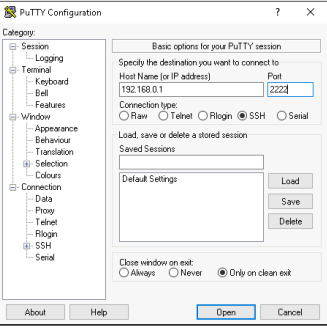
After a successful root login then the following command needs to be executed:
sysmonit -S
The above command will either display:
Primary/Secondary
which indicates that specific server is in the Primary state, or
Secondary/Primary
The graceful shutdown procedure would be to shutdown the server in the Secondary state first, by executing:
poweroff now
Once the server in the Secondary state is down, only then the server in the Primary state should be powered off.
Once done with maintenance or server move, prior powering on the hosts, ensure that they are cabled exactly as before as before. Then, the Primary server must be powered on first. Proceed to wait a 5-10 minutes until the server is in service and only then the Secondary server should be powered on.
Once both servers are up and running, the Maintenance mode can be disabled by selecting the hosts in the 'Hosts' section in the SERVERware GUI and clicking on the option Enable.
1.2 Safely shutting down the servers - SERVERware Cluster Edition
For the Cluster edition, firstly stop all VPSes and set the Processing hosts in the Maintenance mode in the Hosts section of the SERVERware GUI.
After the Processing hosts are in the Maintenance mode and the VPSes are stopped, proceed to power the Processing hosts off - first SSH to the Processing host by following the SSH instructions above (to log in as root as well) and execute:
poweroff now
Once done, then the Storage Mirror needs to be powered off, by following the procedure above (Safely shutting down the servers - SERVERware Mirror Edition)
When the maintenance is complete, please ensure that they are cabled as before, and then the Storage hosts must be powered on first (by following the procedure outlined above for Safely shutting down the servers - SERVERware Mirror Edition) and only after the Storage Hosts are up and running, power on the Processing hosts.
After the Processing hosts are up, they can be Enabled again in the Hosts section and the VPSes can be started again.