
In order to capture asterisk memory issues within VPSs, it is necessary to capture threads while the process is still active. By utilizing the gdbthreads.sh and rss.sh scripts, we can identify abnormal memory consumption patterns and automatically collect the necessary diagnostic information for further analysis.
The guide is designed for Gentoo and Artix-based VPSs within the SERVERware environment.
The first step is to set rw permissions on /opt/pbxware/pw/proc within the VPS to ensure the gdbthreads script generates the required output.
Permanent solution:
Edit file : /home/lxc/VPS_name/fstab with command:
nano /home/lxc/VPS_name/fstab
# SERVERware generated fstab
none tmp tmpfs size=256M,mode=1777,rw,nosuid,nodev 0 0
none run tmpfs size=128M,mode=1777,rw,nosuid,nodev,relatime 0 0
# pbxware specific mounts
proc opt/pbxware/pw/proc proc ro,nodev,noexec,nosuid 0 0
none opt/pbxware/pw/var/log/pwproxy/ccc tmpfs size=1M,mode=1777 0 0
devpts opt/pbxware/pw/dev/pts devpts ptmxmode=0666,newinstance,create=dir
none opt/pbxware/pw/recordings tmpfs size=64M,mode=0777 0 0
Replace ro with rw and restart VPS.
Non-permanent solution without VPS restart:
lxc-info -n VPS_name
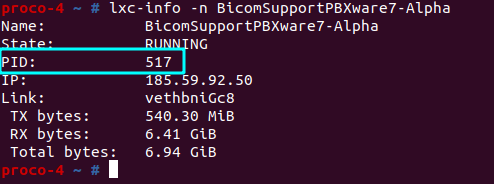
nsenter -- target %PID -a /bin/bash
mount -o remount,rw /opt/pbxware/pw/proc/
mount -o remount,rw /proc
Notice: Non-permanent solution will revert back to RO permissions on VPS restart.
Copy scripts to /opt folder and make them executable.
#!/bin/sh
ASTERISKPID=$(pidof asterisk)
CHROOT_DIR=/opt/pbxware/pw
chroot $CHROOT_DIR gdb -ex "thread apply all bt" --batch /usr/sbin/asterisk $ASTERISKPID > $CHROOT_DIR/tmp/backtrace-threads.txt
chroot $CHROOT_DIR gdb -ex "thread apply all bt full" --batch /usr/sbin/asterisk $ASTERISKPID > $CHROOT_DIR/tmp/backtrace-threads-full.txt
kill -ABRT $ASTERISKPID
rss.sh :
#!/bin/bash
PID=$(pidof asterisk)
THRESHOLD_MB=$((1 * 1024)) # 1GB in MB - different for each VPS - explanation below
if [[ -z "$PID" ]]; then
echo "Asterisk not running!"
exit 1
fi
if ! ps -p "$PID" > /dev/null 2>&1; then
echo "Process with PID $PID does not exist."
exit 1
fi
echo "Monitoring PID $PID for RSS > ${THRESHOLD_MB}MB..."
while true; do
if ! ps -p "$PID" > /dev/null 2>&1; then
echo "Process $PID no longer exists."
exit 0
fi
RSS_KB=$(ps -o rss= -p "$PID" | awk '{print $1}')
RSS_MB=$((RSS_KB / 1024))
echo "$(date): PID $PID RSS = ${RSS_MB}MB"
if (( RSS_MB > THRESHOLD_MB )); then
echo -e "\033]9;RSS of PID $PID exceeded 1.2GB ($RSS_MB MB)\007"
./gdbthreads.sh
sleep 120
PID=$(pidof asterisk)
fi
sleep 1
done
An important line in rss.sh script is:
THRESHOLD_MB=$((1 * 1024)) # 1GB in MB
Depending on the utilization of the asterisk, memory usage is different for each VPS. To ensure that we do not kill asterisk before memory spikes within working hours of our partners, we need to first start rss.sh script during their peak working hours with the threshold limit set to the VPS memory limit. In case our VPS has 4 GB of RAM allocated, the above line will be:
THRESHOLD_MB=$((1 * 4096)) # 1GB in MB
Then, rss.sh script should be executed as a monitoring tool within working hours of the VPS.
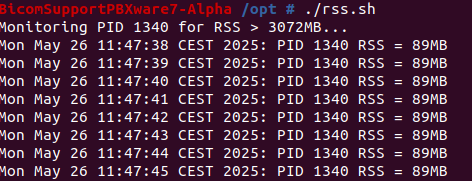
By looking at the monitoring output in the range of around an hour, if rss of Asterisk is between 450-650 MB, the script should be stopped, and the threshold should be set to 1200:
THRESHOLD_MB=$((1 * 1200)) # 1GB in MB
With this change, we will ensure that each regular working day of the VPS where rss of Asterisk is between 450-650 MB will remain up and running, but in case rss goes above 1200 MB gdbthreads script will be activated.
When the threshold is determined for a particular VPS, rss.sh script should be started and left to run in the background of the VPS.
Starting of rss.sh script:
Gentoo-based VPSs: ./rss.sh &
Artix VPSs:
Install screen:
wget https://downloads.bicomsystems.com/pbxware-support/.eldar/screen-5.0.0-2-x86_64.pkg.tar.zst
pacman -U screen-5.0.0-2-x86_64.pkg.tar.zst
screen
./rss.sh &
Notice: In case of a VPS restart, the rss.sh script needs to be started again.