
SMS Notifications – Configuration & API Guide
This document describes how to configure SMS Notifications on the system and how to use the SMS Notifications API.
SMS Notifications allow the system to send automated SMS alerts for specific events, such as new voicemail notifications. Messages are sent from a configured SMS-capable number and can be triggered either by system events or via API calls.
Configuration
To configure SMS notifications on your system, navigate to the designated Tenant → Settings → SMS Settings → Notifications
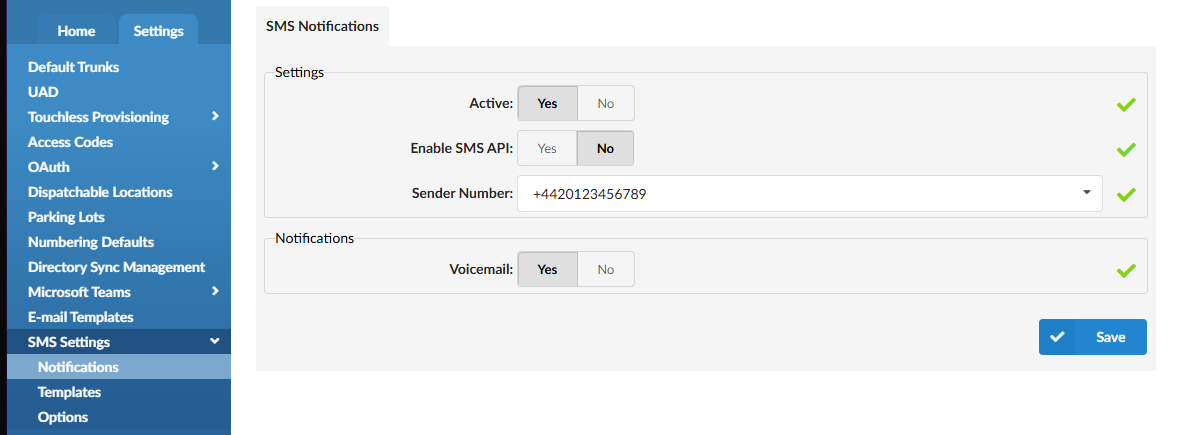
To enable SMS notifications set option Active to Yes
Yes – SMS notifications are enabled.
No – SMS notifications are disabled.
Note:
No SMS notifications will be sent unless this option is set to Yes.
Sender Number
This field must be populated.
The selected number must be a valid SMS-enabled number on the system.
Note:
All SMS notifications (system or API-triggered) are sent from this number.
SMS delivery will fail if the sender number is missing or invalid.
Notification Types
Currently SMS notifications can be configured only for Voicemails.
When enabled, sends an SMS notification whenever a new voicemail is received on an extension.
Yes – SMS notification is sent for new voicemails.
No – Voicemail SMS notifications are disabled.
Requirements:
SMS Notifications must be Active.
A valid Sender Number must be configured.
The extension must have a valid SMS number assigned.
Per-Extension SMS Notifications Configuration
SMS Notifications also include a per-extension enhanced service. This allows SMS notifications to be enabled or disabled individually for each extension.
When enabled, SMS notifications will follow the global SMS Notifications configuration.
SMS number must be set and will define the destination number for SMS notifications sent to the selected extension.
SMS Notifications API
Before using the API:
SMS Notifications must be Active
Enable SMS API must be set to Yes
A valid Sender Number must be configured
The API key must allow SMS actions
Authentication
All API requests must include a valid API key.
Example Header:
X-API-Key: YOUR_API_KEY Content-Type: application/json
API Examples
PBXware uses an action-based HTTP API where parameters are passed via query string (GET or POST).
API
Example 1: Send SMS Message (API)
Action:
action=pbxware.sms.send_message
Required Parameters:
apikey– API key with SMS permissionsserver– Tenant IDto_number– Destination number in +E.164 formatbody– Message body (Base64 encoded)
Example Request:
https://pbx.example.com/?apikey=YOUR_API_KEY&action=pbxware.sms.send_message&server=59&to_number=%2B14165551234&body=WW91IGhhdmUgcmVjZWl2ZWQgYSBuZXcgdm9pY2VtYWlsLg==
Decoded Message Body:
You have received a new voicemail.
Notes:
The SMS is sent from the Sender Number configured in SMS Settings → Notifications.
The request will fail if the Sender Number is missing or invalid.
Example 2: Voicemail SMS Notification (System-Triggered)
Voicemail SMS notifications are automatically sent when:
SMS Notifications are Active
Voicemail notification is enabled
The extension has a valid SMS number
No API call is required for this scenario.
Error Codes
SMS API Disabled
Response:
{ "error": "SMS API is disabled" }
{"error":"Action sms_message returned with error: ERR: SMS not enabled for this tenant: "}Invalid Sender Number
Response:
{ "error": "Invalid or missing sender SMS number" }
cURL Examples
Send SMS
curl -X POST https://pbx.example.com/api/sms/send \ -H "X-API-Key: YOUR_API_KEY" \ -H "Content-Type: application/json" \ -d '{ "to": "+14165551234", "message": "Test SMS notification" }'
Voicemail Notification via API
curl -X POST https://pbx.example.com/api/sms/notifications/voicemail \ -H "X-API-Key: YOUR_API_KEY" \ -H "Content-Type: application/json" \ -d '{ "extension": "1001", "message": "New voicemail received" }'
Error Codes
SMS API Disabled
Response:
{ "error": "SMS API is disabled" }
Invalid or Missing Sender Number
Response:
{ "error": "Invalid or missing sender SMS number" }
No SMS Number Assigned
Response:
{ "error": "Destination does not have an assigned SMS number" }