
With the SERVERware version 5.1 comes a new feature called Services option.
The idea behind the feature is for the SERVERware admins to have information about hosts health in their SERVERware environment.
Besides the health status of the hosts in the SERVERware environment, there will also be information about the CONTROLLER.
There are two new services that are implemented for this functionality:
- sw-status service - which runs on each of the hosts
- sw-ctrl-status service - which runs on the CONTROLLER
sw-ctrl-status service is responsible for gathering all reports about hosts health and presenting them in the SERVERware GUI.
In case that the sw-status service is not responding, there is a timeout after which the status of the host being down is shown on the SERVERware GUI.
Same thing applies for the sw-ctrl-status service.
If you navigate to the following path:
Network --> Services
you will be able to use the new feature of showing status of the hosts.
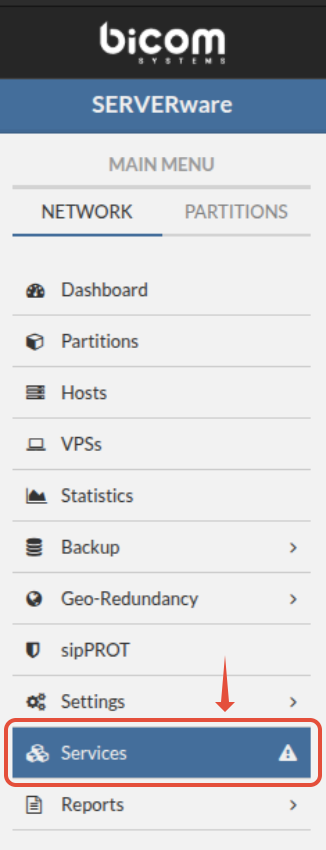
If you click on the button, you will be prompted with a new dashboard. Dashboard will contain information about hosts configured in the SERVERware environment.
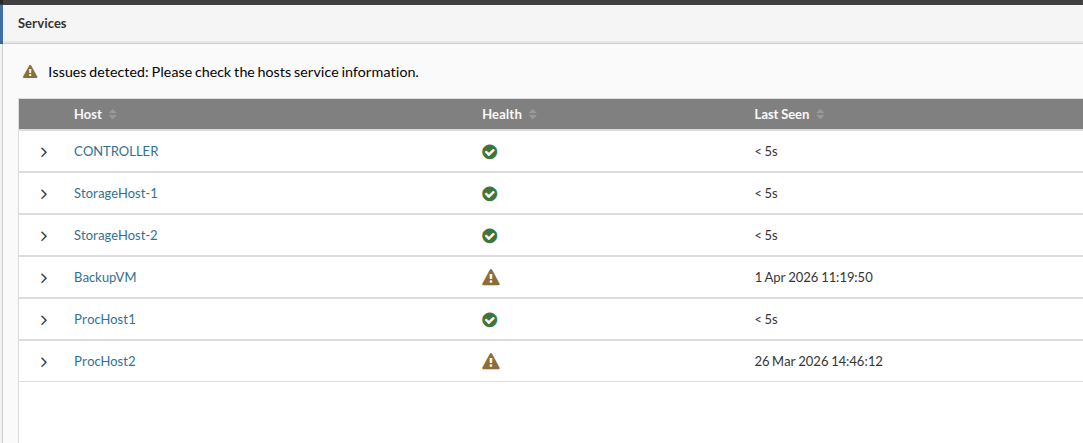
If we pay attention, we will notice an exclamation mark - a WARNING sign. That is an indication that there is some changed in the health of a host(s).

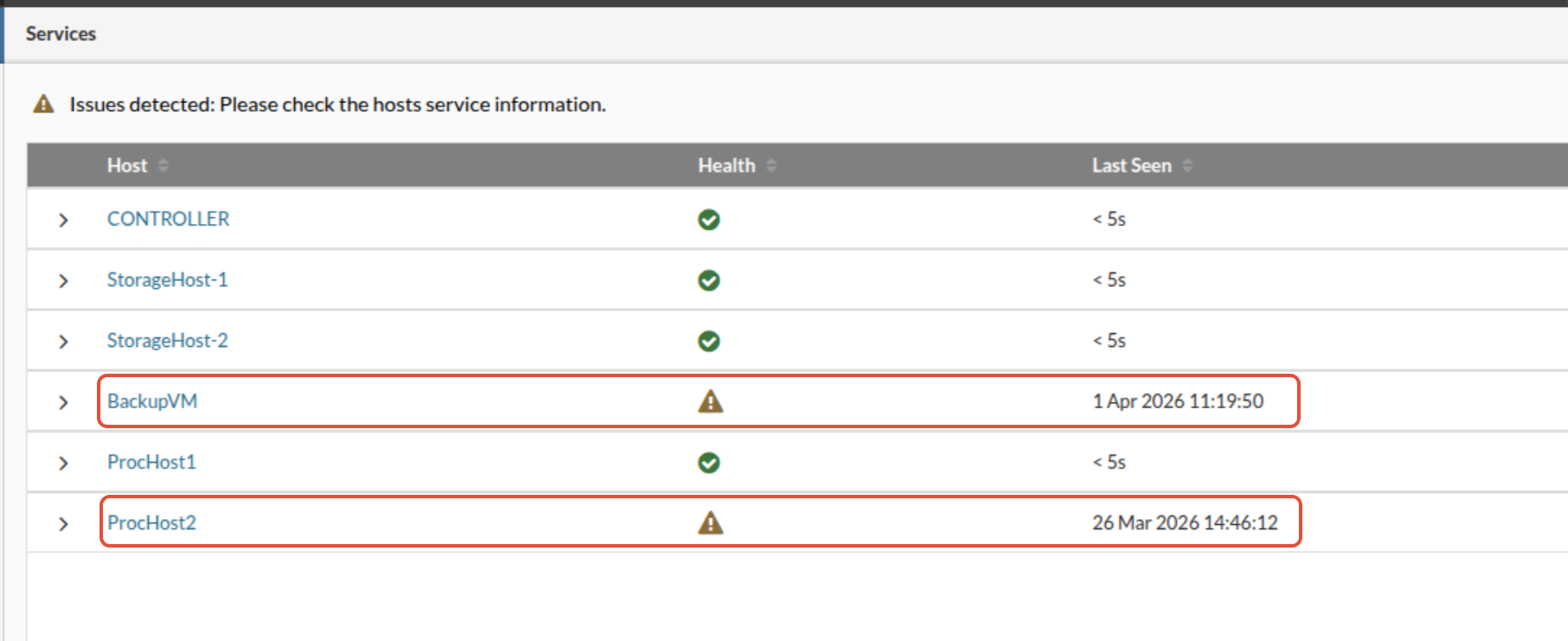
In this case, there are hosts with some kind of changes. We can see that under the "Health" column there is Warning sign and also under the "Last Seen" column we can see the date and time when the host was running with no issues.
If we click on a host that has a Warning message, a new drop-down menu will appear.
In this menu, there will be information about the services running on the host and their status.
Besides those information, there will be information about the version of the service and the time the service was "last seen" - meaning, when the service was last seen running correctly.
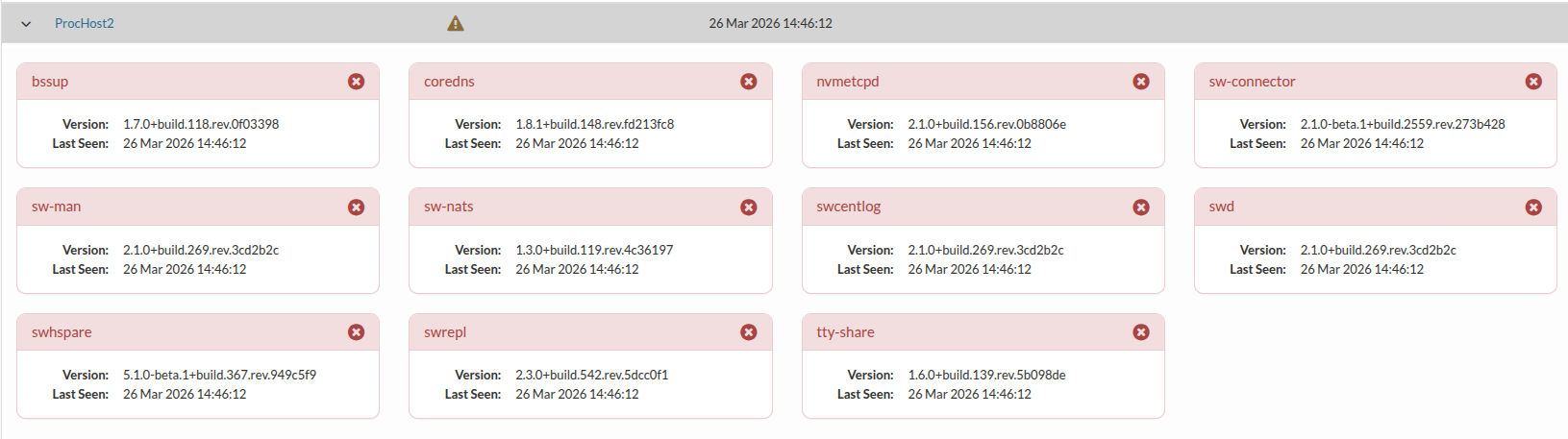
Red color, and the X mark are also an indications that the service has stopped running correctly.
IF ONLY ONE SERVICE HAS ON ONE HOST HAS STOPPED RUNNING, THERE WILL BE A WARNING SIGN ON THE SERVICES OPTION.
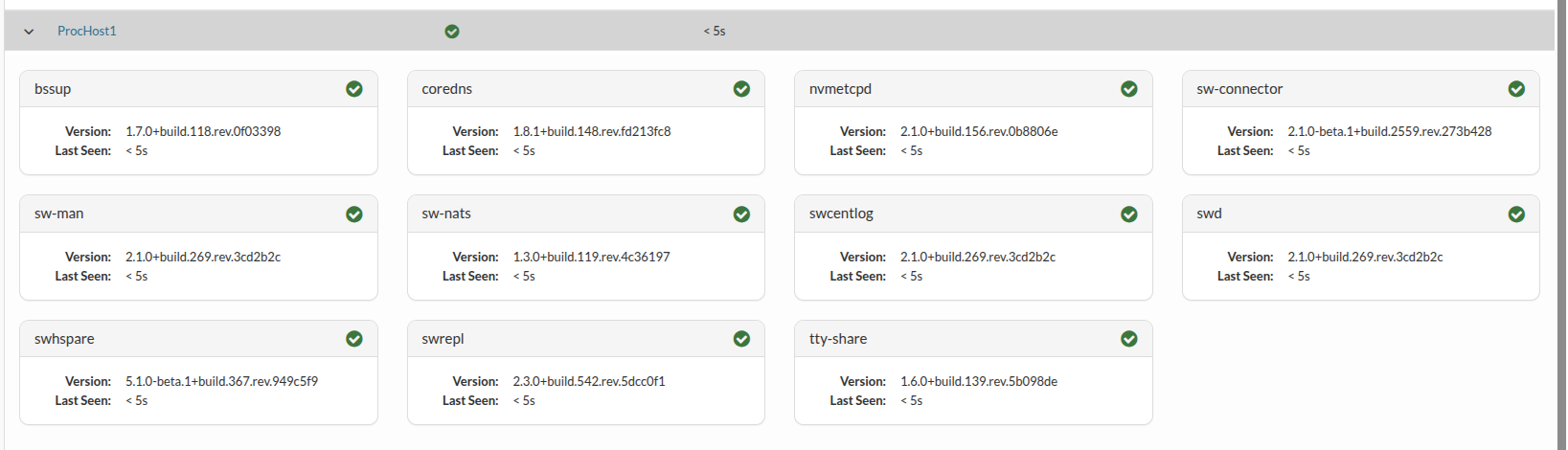
Comparing that to the host, on which all services are running correctly, we will see green color and the check mark on the services.
For example:
If we SSH to the ProcHost1
and execute command:
ProcHost1 / # /etc/init.d/swhspared stop
* Stoping swhspared ...
We will see a change on the Services page for the host ProcHost1.
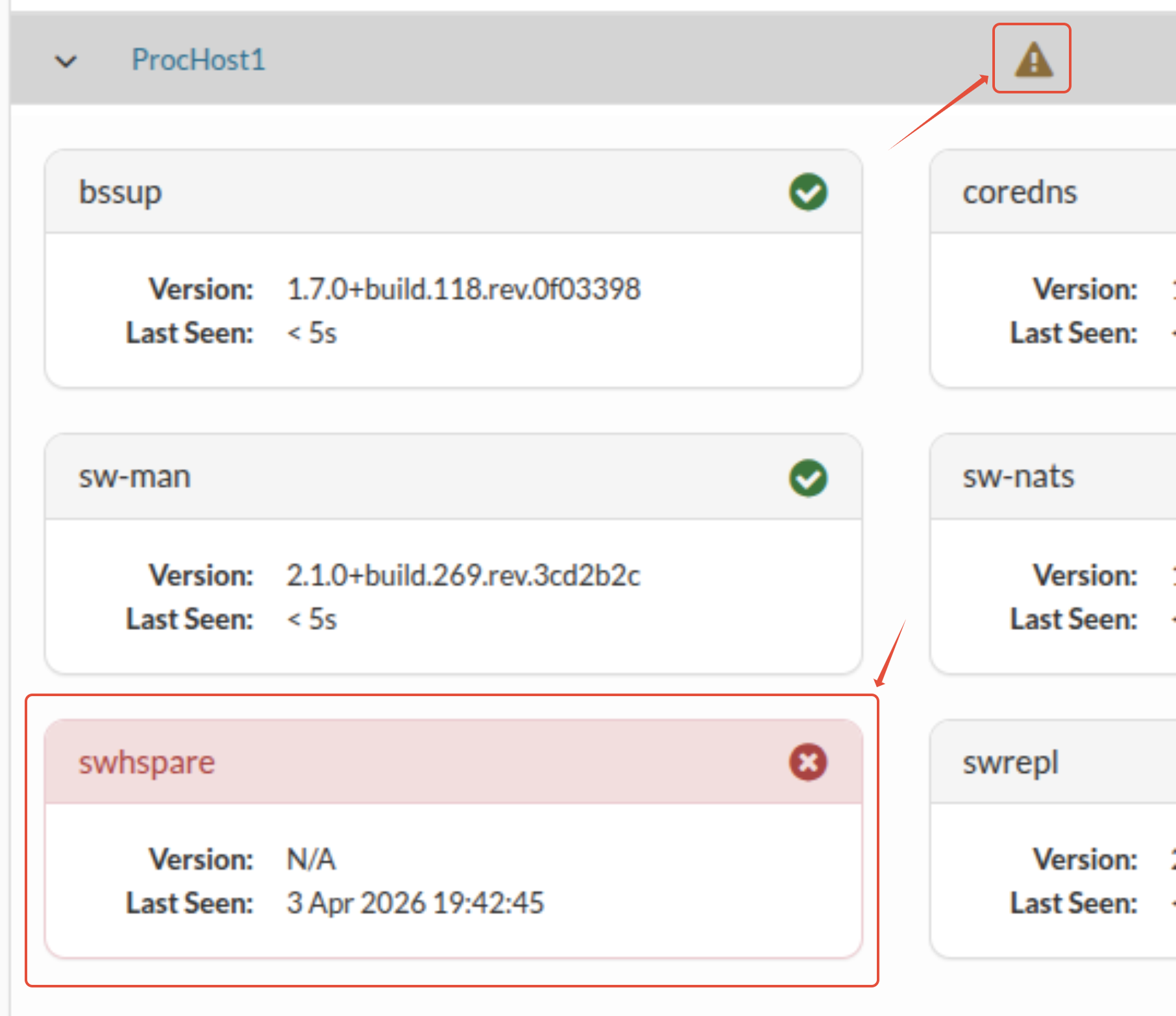
We see that service swhspare has stopped running. And immediately, there is a WARNING sign for the host as well.
If we now execute command:
ProcHost1 / # /etc/init.d/swhspared start
* Starting swhspared ...
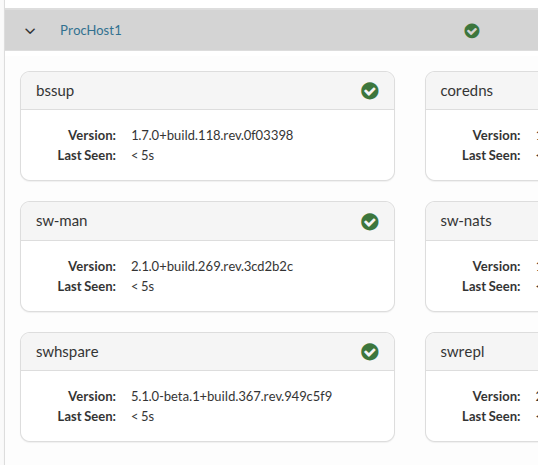
We will see that the service has started running again and the WARNING sign is gone.
If we would like to see settings about the sw-service we would need to execute command:
cat /opt/sw-status/etc/sw-status.yaml
which would gave as an output of all the services running on the hosts. Also, we would see information about the ports on which services are running. Each of the services have their own port through which the requests are polled.
common:
  log: syslog://
  debug: false
  poll_interval_sec: 10
  http_wait_interval_millisec: 200
  cmd_wait_interval_millisec: 1000
  status_update_subject: serverware.status.node
host:
  services:
  - name: swrepl
    port: 9201
  - name: sw-man
    port: 9202
  - name: swd
    port: 9203
  - name: swcentlog
    port: 9204
  - name: swhspare
    port: 9206
  - name: bssup
    port: 9207
  - name: sw-nats
    port: 9208
  - name: nvmetcpd
    port: 8083
  - name: tty-share
    port: 9209
  - name: sw-connector
    port: 9211
  cmd_services:
  - name: coredns
    health_cmd: "rc-service corednsd status"
    version_cmd: "/opt/coredns/bin/coredns -version 2>&1 | awk 'NR==1{split($1,a,\"-\");v=a[2]} NR==2{h=$NF} /^SW:/{s=$2} END{printf \"%s+%s%s\",v,s,h}'"
primary_host:
  services:
  - name: swrepl
    port: 9201
  - name: sw-man
    port: 9202
  - name: swd
    port: 9203
  - name: swcentlog
    port: 9204
  - name: swhspare
    port: 9206
  - name: bssup
    port: 9207
  - name: sw-nats
    port: 9208
  - name: nvmetcpd
    port: 8083
  - name: tty-share
    port: 9209
  - name: sw-connector
    port: 9211
  cmd_services:
  - name: sw_setup_wizard
    health_cmd: "pgrep -x sw"
    version_cmd: "/var/lib/serverware/sw -version 2>&1 | awk '{print $3}'"
  - name: coredns
    health_cmd: "rc-service corednsd status"
    version_cmd: "/opt/coredns/bin/coredns -version 2>&1 | awk 'NR==1{split($1,a,\"-\");v=a[2]} NR==2{h=$NF} /^SW:/{s=$2} END{printf \"%s+%s%s\",v,s,h}'"
  - name: sysmonit
    health_cmd: "pgrep -x sysmonit"
    version_cmd: "/sbin/sysmonit -V 2>&1 | grep 'Version:' | sed 's/.*v//'"
secondary_host:
  services:
  - name: sw-man
    port: 9202
  - name: bssup
    port: 9207
  - name: sw-nats
    port: 9208
  - name: nvmetcpd
    port: 8083
  cmd_services:
  - name: sw_setup_wizard
    health_cmd: "pgrep -x sw"
    version_cmd: "/var/lib/serverware/sw -version 2>&1 | awk '{print $3}'"
  - name: coredns
    health_cmd: "rc-service corednsd status"
    version_cmd: "/opt/coredns/bin/coredns -version 2>&1 | awk 'NR==1{split($1,a,\"-\");v=a[2]} NR==2{h=$NF} /^SW:/{s=$2} END{printf \"%s+%s%s\",v,s,h}'"
  - name: sysmonit
    health_cmd: "pgrep -x sysmonit"
    version_cmd: "/sbin/sysmonit -V 2>&1 | grep 'Version:' | sed 's/.*v//'"
If we would like information in real-time about all the packets that are coming onto CONTROLLER, then we would need to execute command on the CONTROLLER:
CONTROLLER ~ # nats sub serverware.status.node.*
which will give as an output:
11:56:16 Subscribing on serverware.status.node.*
[#1] Received on "serverware.status.node.ab31330535d77742ada4dc893527179f"
{"name":"StorageHost-2","uuid":"ab31330535d77742ada4dc893527179f","node_type":"SECONDARY","timestamp":1775296582,"service_healths":[{"name":"sw-man","status":"ok","version":"2.1.0+build.269.rev.3cd2b2c","last_seen":1775296581},{"name":"bssup","status":"ok","version":"1.7.0+build.118.rev.0f03398","last_seen":1775296581},{"name":"sw-nats","status":"ok","version":"1.3.0+build.119.rev.4c36197","last_seen":1775296581},{"name":"nvmetcpd","status":"ok","version":"2.1.0+build.156.rev.0b8806e","last_seen":1775296581},{"name":"sw_setup_wizard","status":"ok","version":"5.0.0-beta.1+build.348.rev.384645c","last_seen":1775296581},{"name":"coredns","status":"ok","version":"1.8.1+build.148.rev.fd213fc8","last_seen":1775296581},{"name":"sysmonit","status":"ok","version":"1.10-9-g0f60b07","last_seen":1775296581}]}


[#2] Received on "serverware.status.node.0f6629b8ac6f2ce1aa5762564df8c380"
{"name":"StorageHost-1","uuid":"0f6629b8ac6f2ce1aa5762564df8c380","node_type":"PRIMARY","timestamp":1775296582,"service_healths":[{"name":"swrepl","status":"ok","version":"2.3.0+build.542.rev.5dcc0f1","last_seen":1775296581},{"name":"sw-man","status":"ok","version":"2.1.0+build.269.rev.3cd2b2c","last_seen":1775296581},{"name":"swd","status":"ok","version":"2.1.0+build.269.rev.3cd2b2c","last_seen":1775296581},{"name":"swcentlog","status":"ok","version":"2.1.0+build.269.rev.3cd2b2c","last_seen":1775296581},{"name":"swhspare","status":"ok","version":"5.1.0-beta.1+build.367.rev.949c5f9","last_seen":1775296581},{"name":"bssup","status":"ok","version":"1.7.0+build.118.rev.0f03398","last_seen":1775296581},{"name":"sw-nats","status":"ok","version":"1.3.0+build.119.rev.4c36197","last_seen":1775296581},{"name":"nvmetcpd","status":"ok","version":"2.1.0+build.156.rev.0b8806e","last_seen":1775296581},{"name":"tty-share","status":"ok","version":"1.6.0+build.139.rev.5b098de","last_seen":1775296581},{"name":"sw-connector","status":"ok","version":"2.1.0-beta.1+build.2559.rev.273b428","last_seen":1775296581},{"name":"sw_setup_wizard","status":"ok","version":"5.0.0-beta.1+build.348.rev.384645c","last_seen":1775296582},{"name":"coredns","status":"ok","version":"1.8.1+build.148.rev.fd213fc8","last_seen":1775296582},{"name":"sysmonit","status":"ok","version":"1.10-9-g0f60b07","last_seen":1775296582}]}


[#3] Received on "serverware.status.node.d3690452130441a1947cf2017025428a"
{"name":"ProcHost1","uuid":"d3690452130441a1947cf2017025428a","node_type":"HOST","timestamp":1775296586,"service_healths":[{"name":"swrepl","status":"ok","version":"2.3.0+build.542.rev.5dcc0f1","last_seen":1775296585},{"name":"sw-man","status":"ok","version":"2.1.0+build.269.rev.3cd2b2c","last_seen":1775296585},{"name":"swd","status":"ok","version":"2.1.0+build.269.rev.3cd2b2c","last_seen":1775296585},{"name":"swcentlog","status":"ok","version":"2.1.0+build.269.rev.3cd2b2c","last_seen":1775296585},{"name":"swhspare","status":"ok","version":"5.1.0-beta.1+build.367.rev.949c5f9","last_seen":1775296585},{"name":"bssup","status":"ok","version":"1.7.0+build.118.rev.0f03398","last_seen":1775296585},{"name":"sw-nats","status":"ok","version":"1.3.0+build.119.rev.4c36197","last_seen":1775296585},{"name":"nvmetcpd","status":"ok","version":"2.1.0+build.156.rev.0b8806e","last_seen":1775296585},{"name":"tty-share","status":"ok","version":"1.6.0+build.139.rev.5b098de","last_seen":1775296585},{"name":"sw-connector","status":"ok","version":"2.1.0-beta.1+build.2559.rev.273b428","last_seen":1775296585},{"name":"coredns","status":"ok","version":"1.8.1+build.148.rev.fd213fc8","last_seen":1775296586}]}


[#4] Received on "serverware.status.node.9b0f0183f218ce306fe730829e6756e6"
{"name":"CONTROLLER","uuid":"9b0f0183f218ce306fe730829e6756e6","node_type":"CONTROLLER","timestamp":1775296584,"service_healths":[{"name":"sw-auth","status":"ok","version":"5.1.0-beta.1+build.3529.rev.30b0a4cc","last_seen":1775296584},{"name":"sw-mgr","status":"ok","version":"5.1.0-beta.1+build.3529.rev.30b0a4cc","last_seen":1775296584},{"name":"swrepl-ctrl","status":"ok","version":"2.3.0+build.542.rev.5dcc0f1","last_seen":1775296584},{"name":"sw-man","status":"ok","version":"2.1.0+build.269.rev.3cd2b2c","last_seen":1775296584},{"name":"bssup","status":"ok","version":"1.7.0+build.118.rev.0f03398","last_seen":1775296584},{"name":"sw-nats","status":"ok","version":"1.3.0+build.119.rev.4c36197","last_seen":1775296584},{"name":"tty-proxy","status":"ok","version":"1.6.0+build.139.rev.5b098de","last_seen":1775296584},{"name":"sw-connector","status":"ok","version":"2.1.0-beta.1+build.2559.rev.273b428","last_seen":1775296584},{"name":"coredns","status":"ok","version":"1.8.1+build.148.rev.fd213fc8","last_seen":1775296584}]}