
Usually, when a clone of the VPS cannot be created, it is because the VPS in question is a Legacy VPS. To resolve this, you can use the following guide: https://bicomsystems.atlassian.net/wiki/spaces/HST/pages/903118886/How+to+clone+Legacy+VPSes.
However, in a situation where the Gentoo template is being used on the VPS (a template that is no longer available or cannot be installed), we can follow the procedure below.
Let's say we have a VPS named VOUCS, and when attempting to create a clone of the VPS, we encounter the following error:
Error:
Failed to create VPS (please choose a template for the VPS).
When you SSH into the Controller and check the VPS in the sw_vpses table, you will notice that the os_id is NULL. This is the reason why the VPS clone cannot be created.
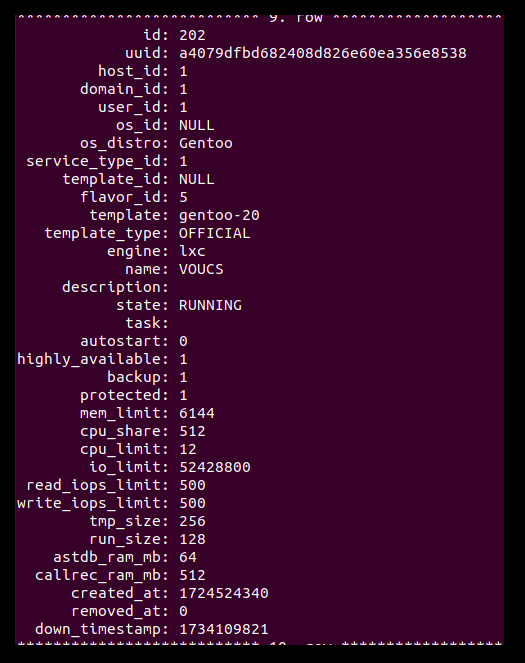
So, let's see what is inside sw_os_templates.
select * from sw_os_templates;
Empty set (0.00 sec)
We can see that there are no os_templates.
To fix this, we will need to add manually entry into os_templates. I will add Gentoo template:
INSERT INTO sw_os_templates (id, distro, name, display_name, version, revision, custom, backing_store, mark, description, state, progress)
VALUES
(1, 'Gentoo', 'gentoo-20', 'Gentoo 20', '20', 0, 0, 'NETSTOR/templates/gentoo-20', 'gentoo', 'Gentoo Base System Template', 'ENABLED', -1);
Check now again sw_os_templates table and update sw_vpses table.
update sw_vpses set os_id=ID_TEMPLETE where name='VPS_NAME';
n my case the command would be:
update sw_vpses set os_id=1 where name='VOUCS';
Creating the clone for this VPS should be successful now.