
TABLE OF CONTENTS
- How to add funds in TELCOware
- How to recognize the problem that calls cost is credited, and that funds are added directly on PBXware (and not on Main Account on TELCoware)?
- HOWTO fix invoice if all previous invoices are paid/completed
- Find out which tenant is in question and what is ID of the master extension.
- HOWTO fix invoice if all previous invoices are not paid/overdue
This PDF document should explain what is the proper way of adding funds on TELCOware that will cover all actions on TELCOware (purchasing Products and Items through TELCOware Shop) and provide enough funds for the PBXware master extension.
Another purpose of this document is to provide steps to resolve issues that can happen if the Partner used the wrong option to add funds.
How to add funds in TELCOware
There are two ways of adding funds through TELCOware and one way through PBXware • Adding funds to Main Account
• Adding funds to Telephony Account(s)
• Credit/Debit section on PBXware master extension
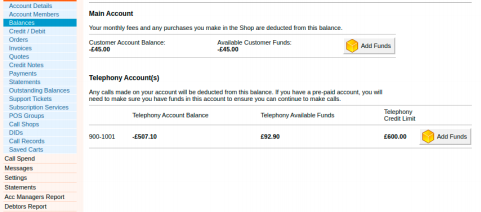
Adding funds to Main Account will add funds to Account’s balance on TELCOware.
These funds will be used for paying invoices/purchasing items through Shop and sending funds to PBXware master extension.
At the end of the month, the TELCOware system will send some of the funds to the master extension, and clients will be able to make calls.
This is the correct way of adding funds.
The second way is adding funds ONLY to a master extension. This will immediately add funds to the PBXware billing extension but it will not cover invoice costs. This option is not recommended.
The third way (and its negative impact) is actually the one we will cover in this document. Adding funds directly on PBXware, through the Credit/Debit section is not recommended as it can lead to issues with crediting costs for all calls.
How to recognize the problem that calls cost is credited, and that funds are added directly on PBXware (and not on Main Account on TELCoware)?
You can recognize that by opening the Invoice of the affected Account.
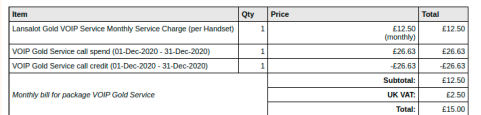
Once we see this, it is time to confirm if Partner added any funds on PBXware:

Now that we located the problem, we can try to fix it by looking at PBXware MySQL and correcting the balance for the affected PBXware master extension.
We need to be aware of two possible scenarios, first one is that account can have all invoices paid (completed), and that account can have some invoices unpaid (overdue).
HOWTO fix invoice if all previous invoices are paid/completed
Find out which tenant is in question and what is ID of the master extension.
We can determine that if we go to Account → Subscription Service
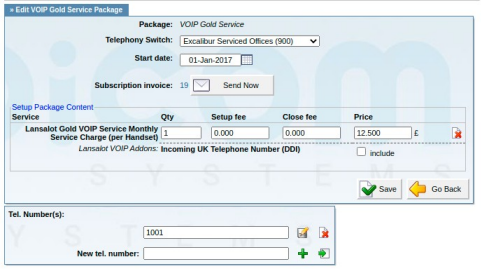
We can see from the screenshot that the tenant in question is 900 and the master extension is 1001. Now, we are interested in the ID of extension 1001 on tenant 900.
We can locate that when editing extension and finding id=X in the address bar, for example:
https://PBX_IP/?app=pbxware&t=users&v=users:ext&id= 379 &server=4&rpage=1
Once we have the tenant number and ID of the master extension, we can log into MySQL and fix
the issue:
/opt/pbxware/sh/mysql

use admin_site;
Table we are interested in is: 900_pbxware_billing (for this account)
select sum(amount) from 900_pbxware_billing where related_id = '379';
we can expect similar result:
sum(amount): 435.8088450431824
This means that this extension has 435.8088450431824 more funds than needed, so we need to add debit in the same amount (sum has to be 0).
To correct that, we run the following command:
insert into 900_pbxware_billing Values(379,'2021-01-30 20:30:25',0,0,'','Correction','Bicom Support','-435.8088450431824','debit');
Why we used this format, you can check with the command
describe 900_pbxware_billing;
In this case, I used the date: January 30, at 20:30:25, but it will be different in your case.
For example, if the billing date is set on March 1-st and you are fixing this in March, then you would need to set a date in February (ideally the last day of the month).
After this latest command, we are checking the sum again. It should be 0 (or close to 0, for example, 0.00000126455).
The last step to check if this account’s invoice is fixed is to go again Under Billing --→ Subscription -- → Outstanding, and Run invoices and check invoice for that account, If the call credit line is missing, then the problem is resolved.
Pay attention that you only use the RUN button. DO NOT use Bill Now button under the Outstanding section.HOWTO fix invoice if all previous invoices are not paid/overdue
Find out tenant number and master extension’s ID.
Determinate how much overdue invoices are and what are their Item prices.
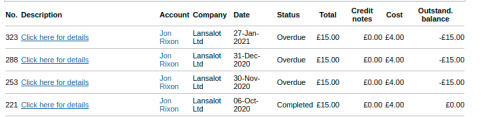
Here we can see that the total overdue invoices are 3.
Open all of them and check what is Price for Item (it should be the same for all invoices, as this is actually the product to which the user is subscribed, it is not related to PBXware calls)

Ignore call spend and call credit lines and you will see that Price (the price we are interested in is 12.5). Sum this for all unpaid invoices. In my case, 3 overdue invoices * 12.5 = 37.5.
Write down the number you get as you will need it later.
Again, in MySQL, we check sum(amount).
For example:
select sum(amount) from 900_pbxware_billing where related_id = '379';
We receive (for example):
sum(amount): 409.19699
Please note in this case, after we finish everything, the sum cannot be 0, it has to be -37.5 (in my case). It must be value in the same amount that the user owes to the TELCOware system.
To correct the problem, we enter:
insert into 900_pbxware_billing Values(379,'2021-01-30 20:30:25',0,0,'','Correction','Bicom Support','-446.69699','debit');
Check sum:
select sum(amount) from 900_pbxware_billing where related_id = '379';

sum(amount): -37.5
This should be fine now.
In order to confirm that, go to Outstanding, run invoices, and check pending invoices for this Account.